The trap scoreboard · Bookkeeping
We planted five traps in four ledgers. The free one scored best.
The full trap scoreboard from our bookkeeping trials: the same five planted errors — a duplicate charge, a refunded deposit, an unidentifiable vendor, a foreign-currency charge and a two-week hole in the bank feed — run through QuickBooks Online, Xero, FreshBooks and Wave. The free ledger scored highest, and the reason is not that it is smarter. It is that it makes "not sure" visible.
Some links below are affiliate links — if you subscribe through one, we earn a commission at no extra cost to you. It never changes a verdict; every tool runs the same test books. Full disclosure
Every set of books we test contains the same five planted errors. They are not exotic. They are the five things that go wrong in a real small business’s books most months, and they sit in the same 162 transactions every time:
- A duplicate charge. HOME DEPOT, $342.17, twice on the same day.
- A refunded deposit. A $1,500 patio deposit in April, refunded in May.
- A vendor nobody can identify. “K PLM HOLDINGS 8842”, $145.
- A foreign-currency charge. A EUR 214.50 parts order, plus a $6.97 foreign-transaction fee.
- A hole in the bank feed. Two weeks of checking transactions, June 8–21, simply missing.
Each trap is worth two points on our 32-point checklist, so ten points in all. We have now run all four ledgers through them. Here is the whole scoreboard in one place.
| QuickBooks Online | Xero | Wave | FreshBooks | |
|---|---|---|---|---|
| Tested tier | Essentials, $85/mo | Growing, $55/mo | Starter, $0 | Plus, $43/mo |
| Duplicate charge | 0 | 0 | 0 | 2 |
| Refunded deposit | 1 | 1 | 2 | 1 |
| Unidentifiable vendor | 1 | 1 | 2 | 2 |
| Foreign-currency charge | 1 | 1 | 2 | 1 |
| Two-week feed gap | 1 | 1 | 1 | 0 |
| Total, out of 10 | 4 | 4 | 7 | 6 |
Prices are as we verified them on the vendors’ own pricing pages, Aug 10–15, 2026. The pricing tracker has the current figures.
The free ledger scored highest. Wave’s Starter tier costs nothing and caught more of our traps than either platform most solo bookkeepers actually run. That is not because Wave is clever. Wave never suggests a category for anything. It is because Wave, like FreshBooks, treats “we don’t know yet” as a state the books can be in.
What the winners have in common
Walk the table row by row and the same pattern keeps appearing.
The unidentifiable vendor. Nobody can categorize “K PLM HOLDINGS 8842”. That is the point of it. The only right answer is to hold it somewhere visible and ask the client. Wave and FreshBooks both have that place built in. FreshBooks marks the line with a red Uncategorized badge and prompts about it on the dashboard. Wave parks it as Uncategorized and tracks a per-line “reviewed” flag, so our ledger finished with exactly one unreviewed line: that one.
QuickBooks and Xero have no such state. QuickBooks left the category blank but displayed the line exactly like its confident guesses. It also rewrote the bank’s descriptor from “K PLM HOLDINGS 8842” to “L M Holdings”, which destroys the only clue the client could use to identify it. Xero kept the descriptor intact but has no built-in holding account at all. We had to create one and call it “Ask the Client”.
Neither of the paid tools guessed wrong here, which is why we gave each one point rather than zero. But neither said anything either. The hardest question in categorizing, knowing what you don’t know, was left entirely to the person doing the books.
The refunded deposit. A $1,500 deposit followed by a $1,500 refund should net to zero. Wave got there by design: it books a deposit as a credit held for that customer, and when the refund arrived it offered “J. Thompson — $1,500.00 Available” to apply against it.
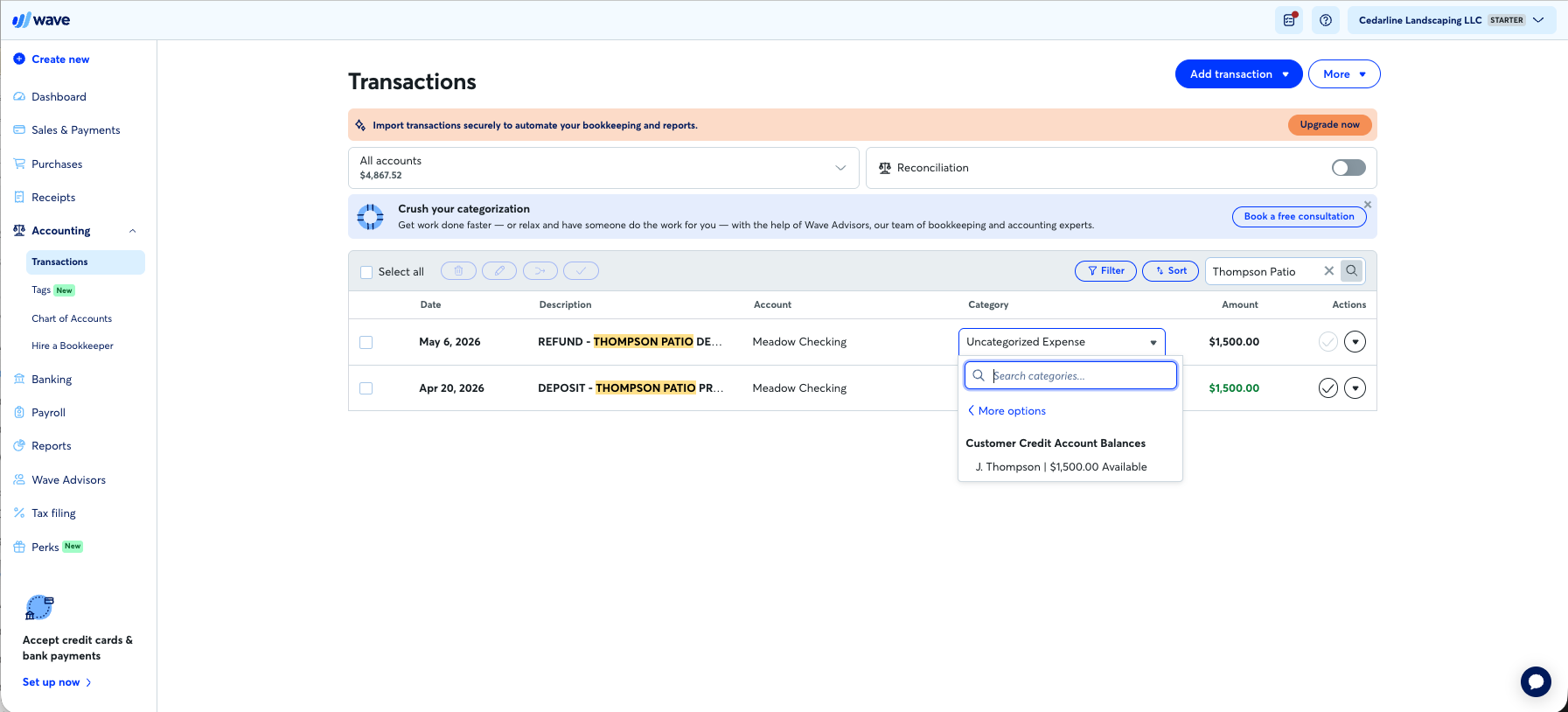
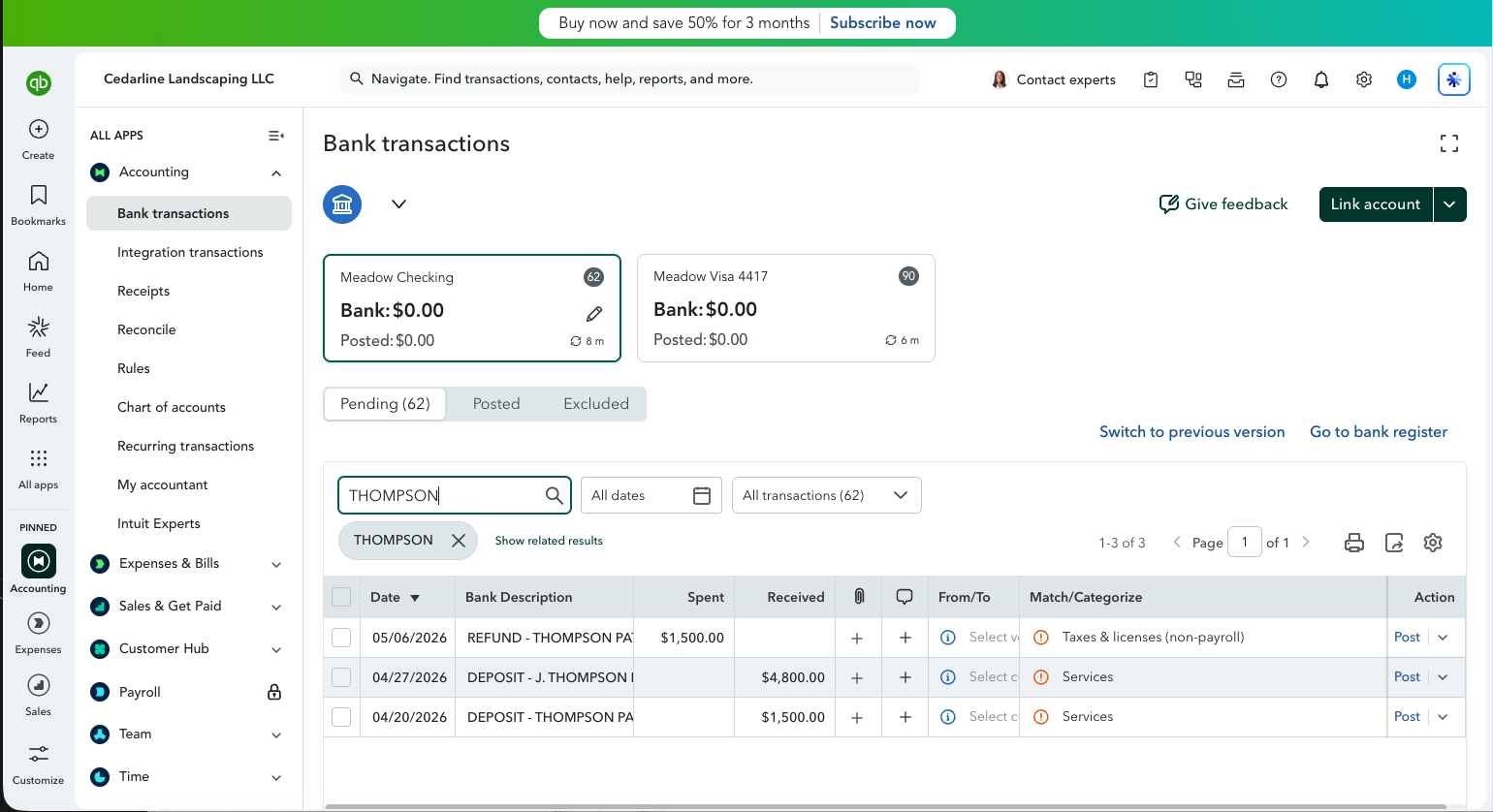
QuickBooks went the other way. Its suggestions would have booked the deposit as income and the refund as a “Taxes & licenses” expense: $1,500 of income that never happened and $1,500 of expense that never happened, with the word REFUND sitting in the bank descriptor the whole time. Xero suggested nothing, which is better than suggesting something wrong. The correct treatment was easy to apply by hand in both. FreshBooks nets out correctly but only by inflating revenue and expenses by $1,500 each; its expense model has no way to pair the two.
The foreign-currency charge. The bank had already converted the euros, so every ledger saw ordinary dollars. Wave booked the parts and the fee to sensible accounts with no friction. Xero and FreshBooks sent the fee to a ready-made bank-fees account. QuickBooks needed a bank-charges account that did not exist in its default chart, so the fee needed an extra step.
This is the closest row on the board, and the scores rest on small differences. QuickBooks, Xero and FreshBooks each lost a point because none of them showed any awareness of the foreign currency at import. For Xero and FreshBooks, the fee itself went through cleanly. Wave has no multi-currency features at all on its free tier. It scored full marks purely for booking the converted amounts without friction. For a client who invoices or buys in euros regularly, this row would need its own test.
Where the pattern breaks
Two rows do not fit the story neatly, and they matter.
The duplicate charge. Only FreshBooks caught it, by flagging both twins at import. Wave missed it along with QuickBooks and Xero. We covered this one in detail in We booked the same $342.17 twice. A first-class “uncertain” state does nothing if the tool never decides a line is uncertain.
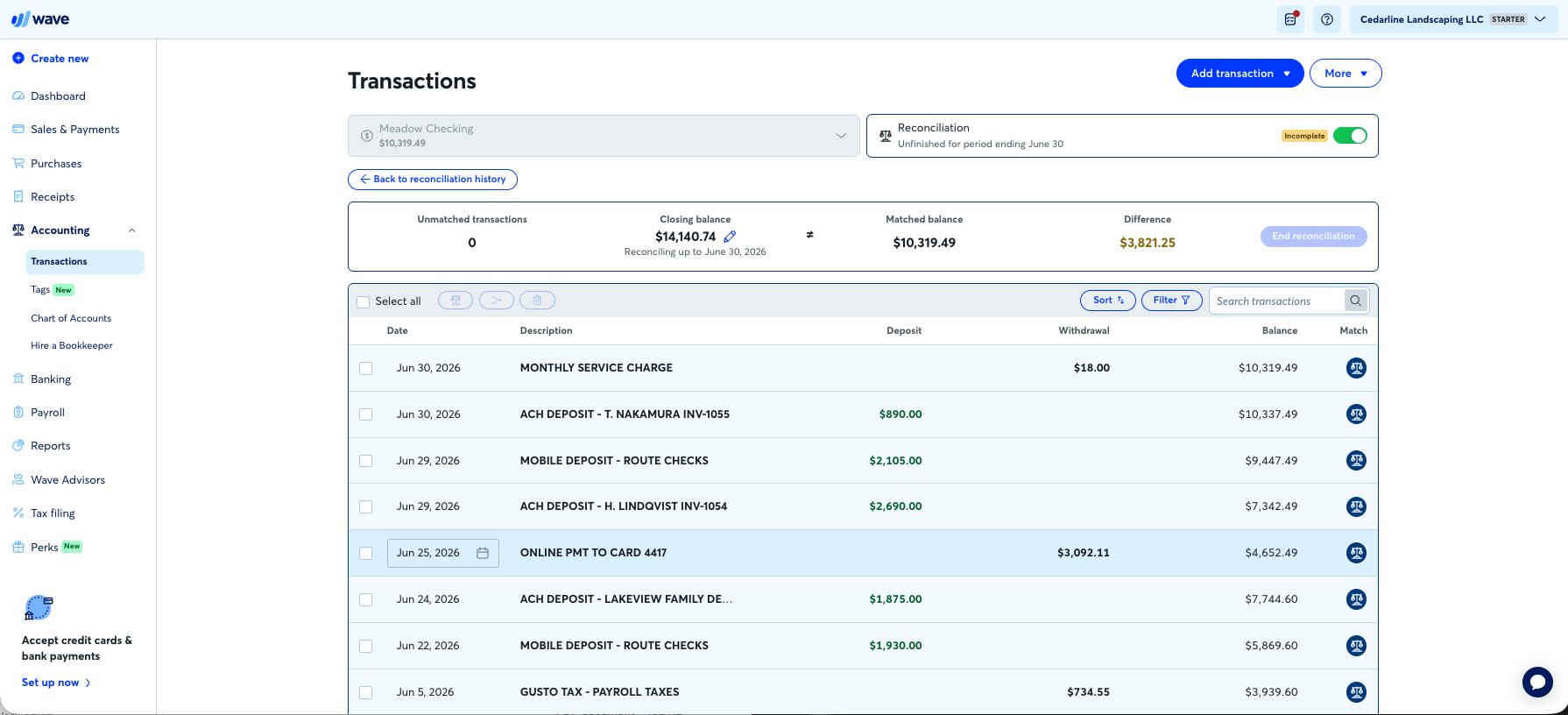
The hole in the bank feed. No ledger scored full marks. QuickBooks and Wave both refused to reconcile: each showed the same unexplained $3,821.25 difference. Neither pointed at the two-week silence that caused it, even though Wave’s own screen jumps straight from June 5 to June 22.
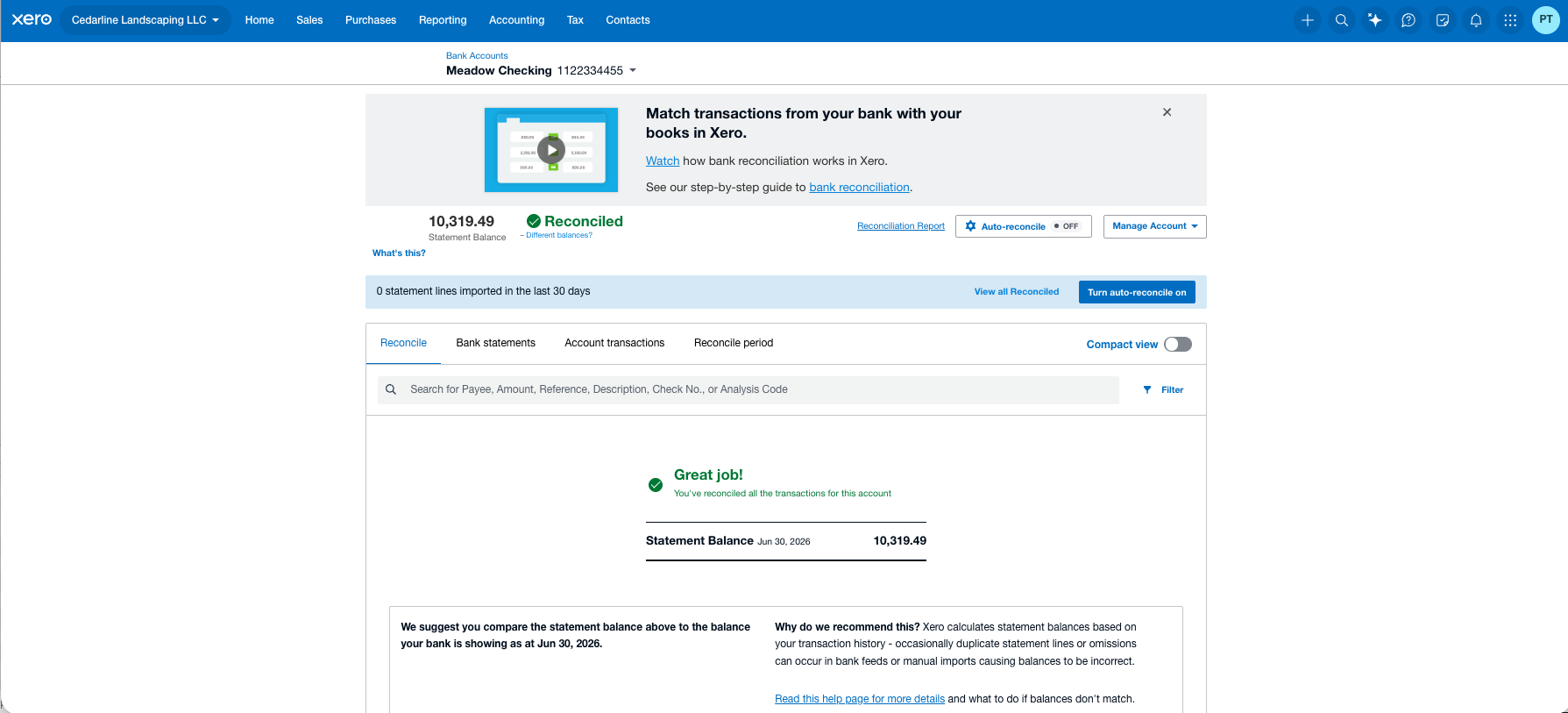
Xero went the other way. With our imported statements it had no independent ending balance to check against, so it showed the gapped quarter as fully reconciled, all green. Its repair tools were the best of the four once we found the hole ourselves. That is why its score is a judgment call: zero for noticing, full marks for fixing. FreshBooks scored zero because in the mode we tested, expenses entered without a bank connection, there is no reconciliation to fail. Its bank-connected mode does reconcile. We could not test that without real bank accounts, and we say so rather than guess.
What to take from the scoreboard
Traps are ten points out of 32. Xero still has the highest total score of the four ledgers, 25 of 32, on the strength of everything else it does well. Wave’s 22 comes with real limits for a growing client: bank feeds, rules and bookkeeper access all sit behind its $19 Pro tier. Nobody should switch ledgers on this table alone.
But the table does answer one practical question: what will this tool do when something is wrong? The paid platforms are built around confident automation, suggestions and rules that keep lines moving. When the data is ambiguous, that confidence either produces a wrong answer, as with QuickBooks and the refund, or an answer that looks exactly like a right one, as with the unflagged vendor and Xero’s green reconciliation.
If your client’s books run on QuickBooks or Xero, the tool will not hold your uncertainty for you. Build that place yourself: a visible holding account for anything unidentified, and a reconciliation against the bank’s own statement balance rather than one the software produced. Our tests say the software will not insist on either.
Related: QuickBooks Online vs Xero for a solo practice · When to move a client off Wave · 7 workflow mistakes solo bookkeepers make · How we test
Filed under: quickbooks · xero · freshbooks · wave · original research · test dataset