Head-to-head · Bookkeeping
FreshBooks vs QuickBooks for bookkeepers with freelancer clients
We ran the same messy quarter of books through FreshBooks and QuickBooks Online — and the $23 invoicing tool caught the error both major accounting platforms missed. Where FreshBooks genuinely wins, where its model hits a wall, and which clients belong on which.
Some links below are affiliate links — if you subscribe through one, we earn a commission at no extra cost to you. It never changes a verdict; every tool runs the same test books. Full disclosure
Here’s a sentence we didn’t expect to write: in our trials, the $23-a-month invoicing tool caught a bookkeeping error that both of the market-leading accounting platforms waved straight through. We planted an identical duplicated charge — same vendor, same day, same $342.17 — in the books we import into every tool we review. QuickBooks Online missed it. So did Xero. FreshBooks flagged both copies at import, put them in a dedicated potential-duplicates queue, and correctly ignored five decoy charges with the same amount on other dates.
That result frames this whole comparison, because it captures what FreshBooks is: a tool that has poured its craft into a narrower job. For a bookkeeper whose clients are freelancers and solo service providers — invoices out, card expenses in, no loans, no equipment, no inventory — that narrower job is the whole job, and FreshBooks does parts of it better than QuickBooks. The moment a client has a balance-sheet life, FreshBooks’ model hits a wall that no amount of polish gets over. This review is about finding exactly where that wall is.
How we tested
Same method as our QuickBooks vs Xero comparison: identical sample books — a fictional company’s full quarter, 162 transactions, 18 invoices, five planted traps — imported into a fresh trial of each tool and scored on the same 32-point checklist. FreshBooks was tested on its Plus tier; QuickBooks on Essentials. Full methodology and the downloadable dataset are on How we test.
One honest note on fit: our test company is a landscaping business with payroll, an equipment loan, and a $2,899 mower — deliberately more than a freelancer’s books, which is exactly what lets us find FreshBooks’ boundaries. Where a limitation only matters for business types FreshBooks isn’t built for, we say so.
Pricing, verified
Checked at signup, August 11, 2026 — and FreshBooks prices on an axis neither competitor uses: how many clients you can bill.
| FreshBooks | QuickBooks Online | |
|---|---|---|
| Entry tier | Lite — $23/mo, capped at 5 billable clients | Simple Start — $38/mo |
| Tier we tested | Plus — $43/mo, 50 billable clients | Essentials — $85/mo |
| Upper tier | Premium — $70/mo, unlimited clients | Plus/Advanced — higher |
| Promo at test time (Aug 2026) | 90% off 3 months | 90% off 3 months (ends 8/27) |
| Card required for trial | NO — only tool of the three we’ve tested | Yes, and it can’t be removed |
| Free accountant seat | Yes — dedicated Accountant role | Yes — via QBO Accountant firm invite |
Numbers age; the pricing tracker carries the current, dated verification for every tool we test.
Mind that client cap: Lite’s five billable clients couldn’t even hold our small test company’s customer list (twelve). For a freelancer with three retainer clients, Lite at $23 is genuinely cheap; for anyone else it’s a mirage tier. And credit where due on trials: FreshBooks was the only tool of the three that started a trial without demanding a credit card — both QuickBooks and Xero take a card they won’t let you remove, converting automatically unless you cancel. A trial with no card is just a trial.
Update, September 30, 2026. QuickBooks Online now has a $0 Free plan, which wasn’t on its pricing page when we compared the two in August. We haven’t trialed it. QuickBooks’ pricing page gives it two invoices a month, one bank connection and “No accountant access”, so it doesn’t replace either plan compared here: a freelancer who bills more than twice a month outgrows it, and their bookkeeper can’t be given a seat. FreshBooks Lite, at $23 with its free Accountant role, is still the cheapest plan of the two that a bookkeeper can actually work in.
The duplicate: FreshBooks’ finest moment
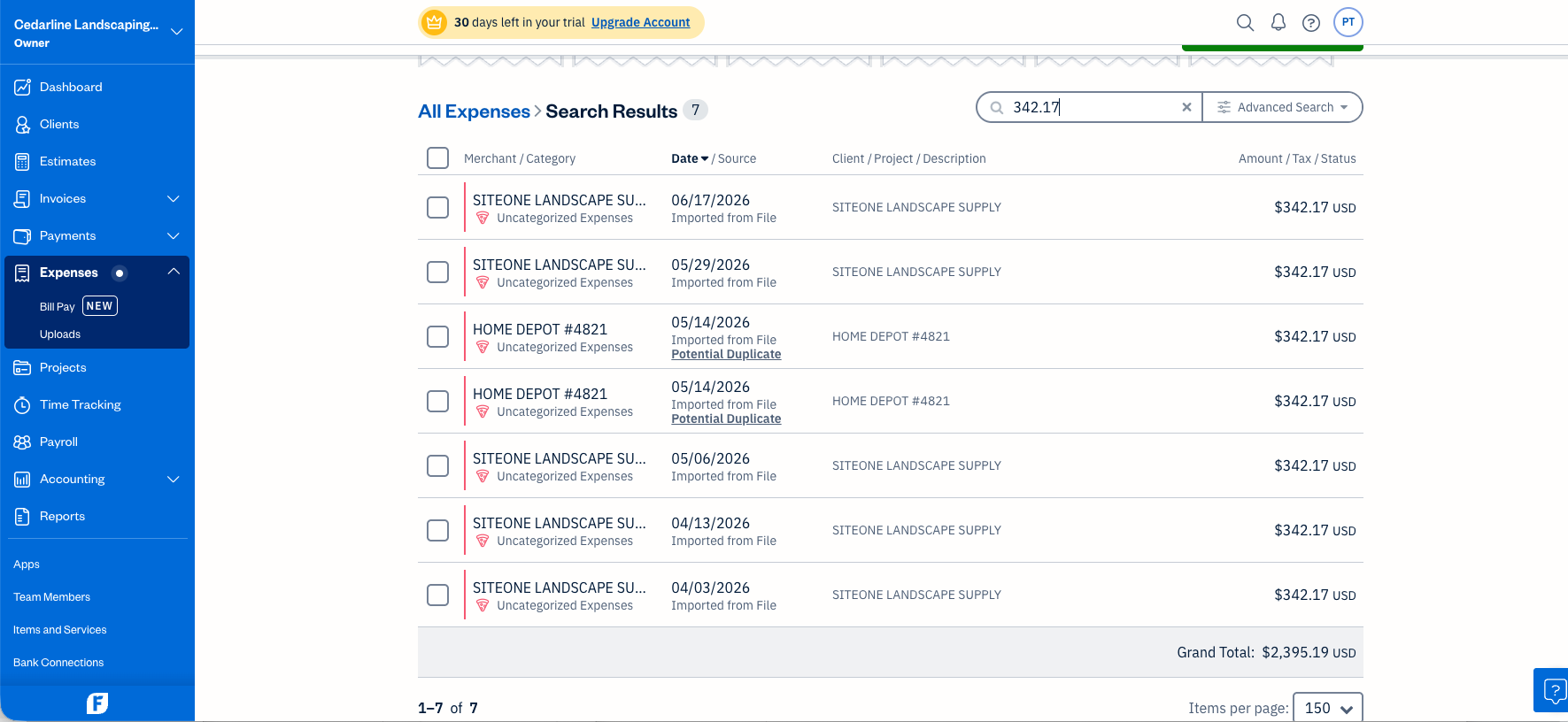
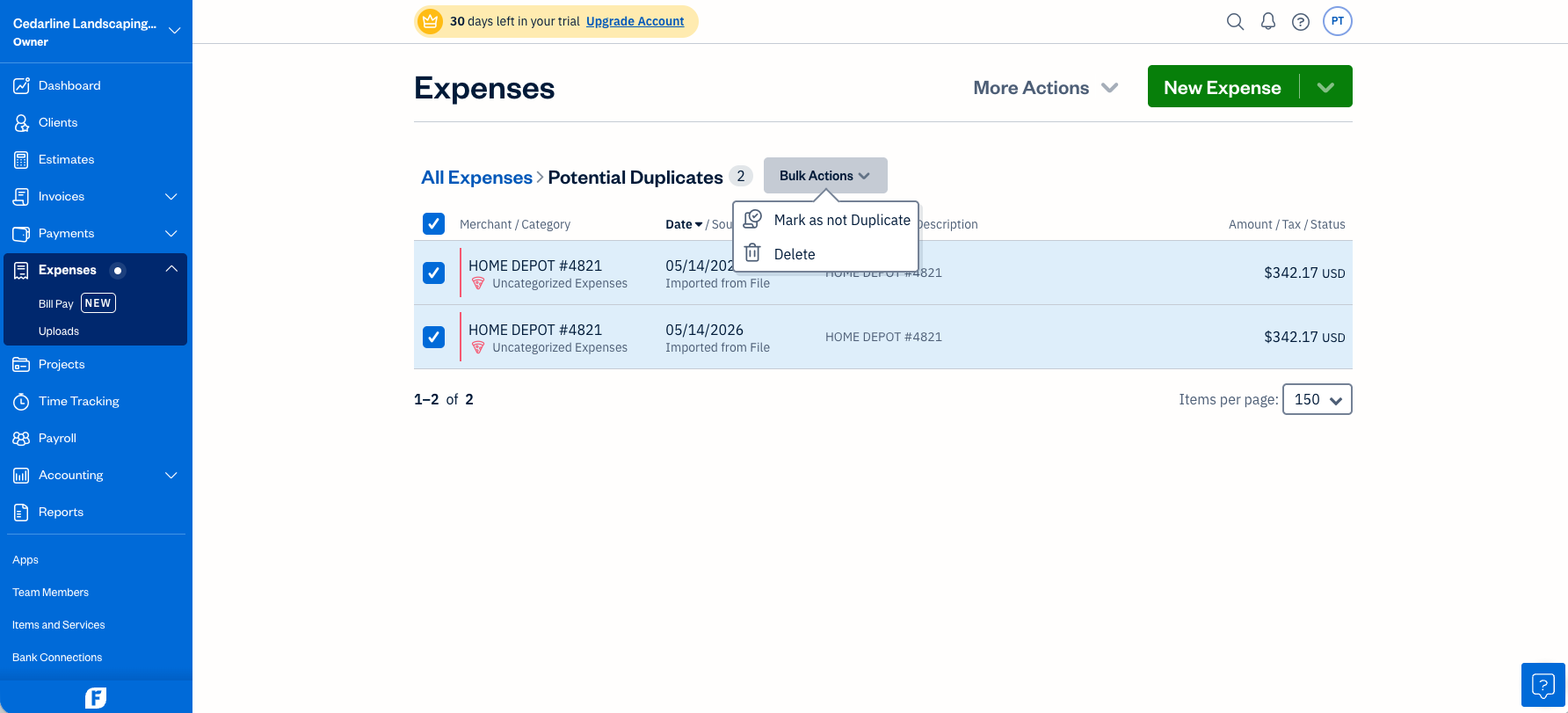
For contrast, here is the same pair of charges in QuickBooks Online — two identical rows, two innocent Post buttons, no flag of any kind:
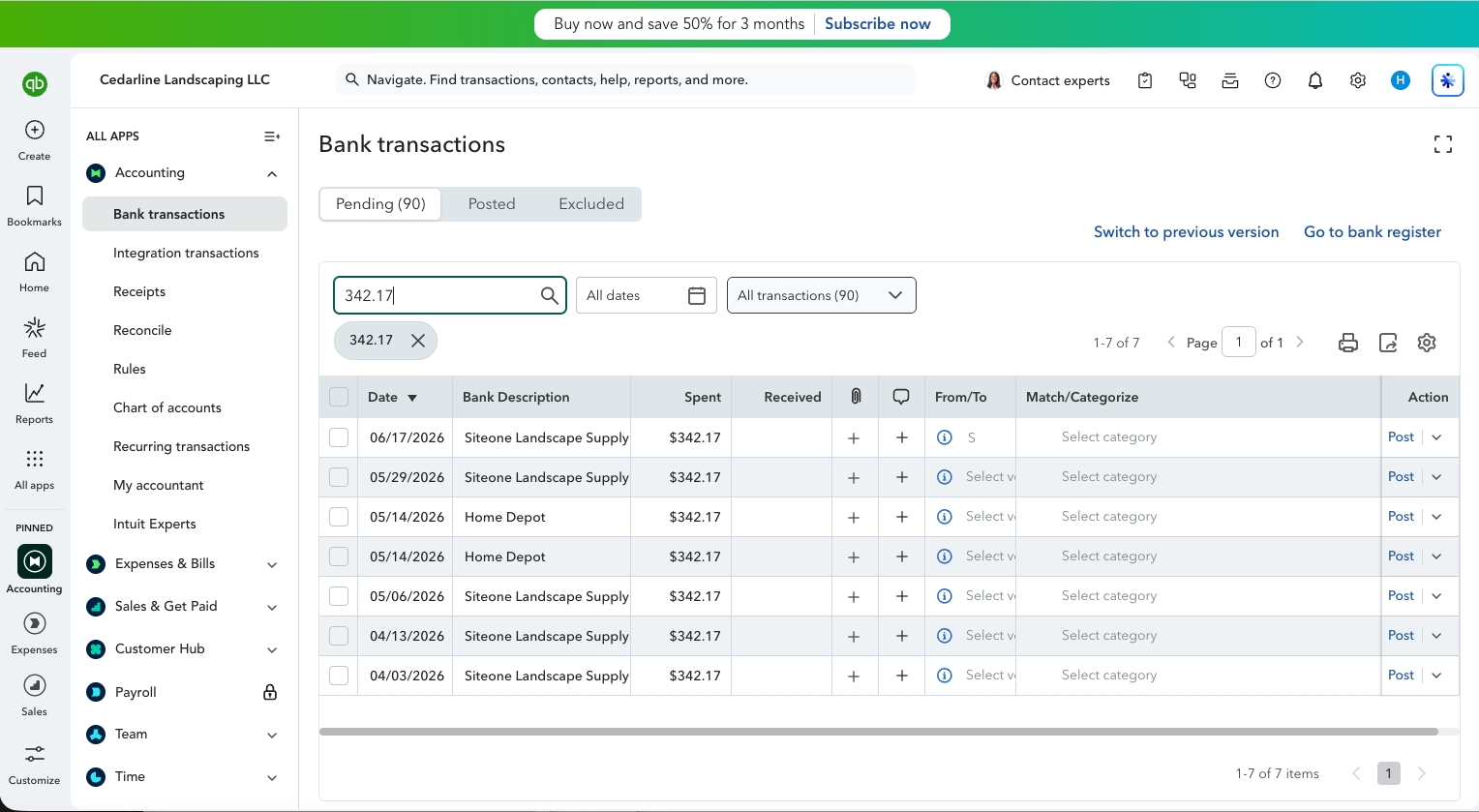
Duplicate detection is arguably the single most mechanical safety check bookkeeping software can do, and the industry’s two leaders don’t do it on imported data. FreshBooks proves it’s not hard: merchant + amount + date, flag both, let a human decide. If your workflow leans on imported card statements, this feature alone prevents real, recurring, embarrassing errors.
Getting books in: craft vs. importers
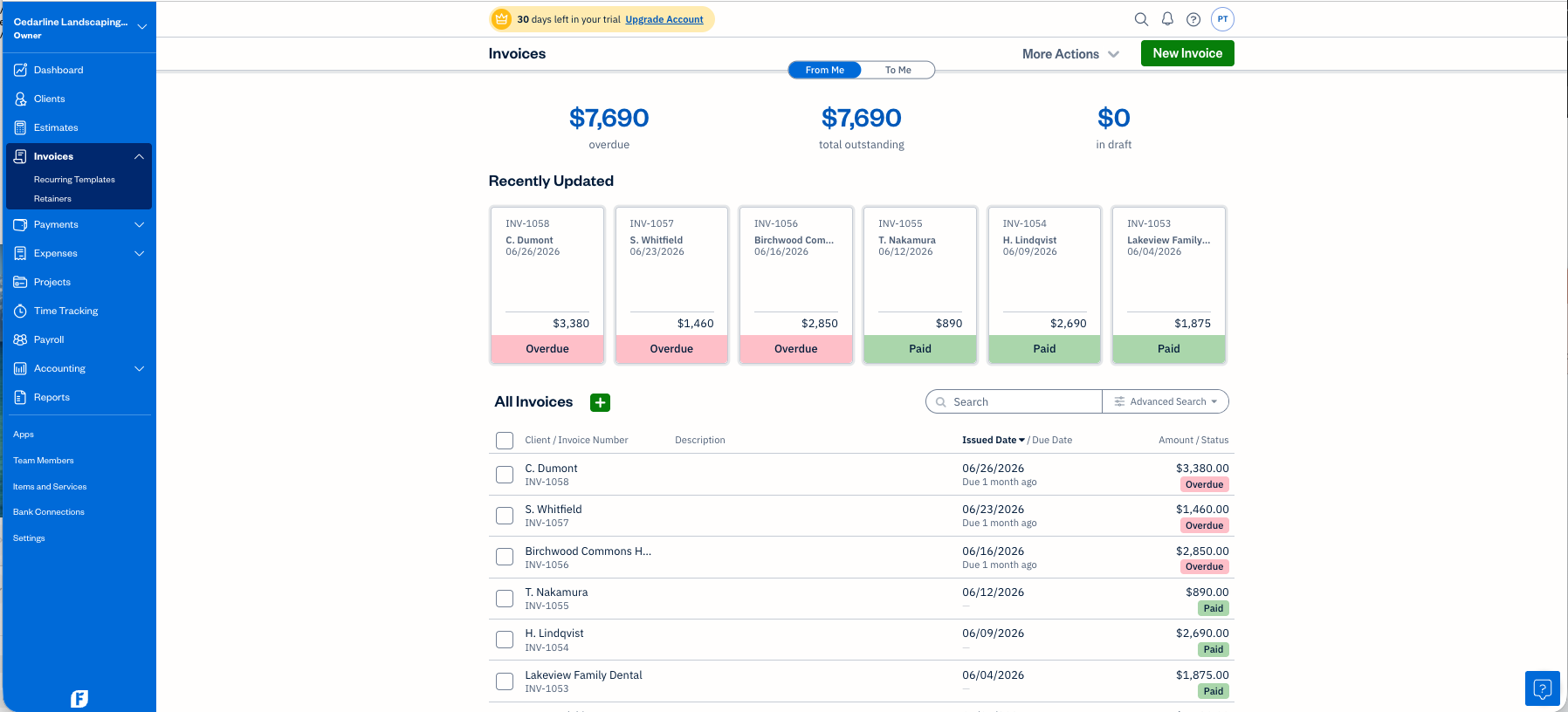
The import story splits cleanly. FreshBooks has the better import screens and the worse import coverage. Its expense importer took all 130 of our lines with explicit date-format and currency selectors — the exact controls whose absence made QuickBooks silently reject ISO dates and mangle special characters. But that’s the only importer it has. Invoices? There is no invoice import. Our 18 test invoices went in by hand.
To FreshBooks’ credit, manual entry is quick: it noticed our invoice numbering format and auto-incremented it, recording a payment auto-resolves a draft, and the whole run — 18 invoices plus 15 payments — took 27 minutes. That’s genuinely fine for onboarding a fresh freelancer client with no history. Now do the migration math for a client with 300 historical invoices: seven-plus hours of typing. The missing importer is the hidden price of FreshBooks, and you pay it precisely when moving an established client in.
QuickBooks, for all its import-format fussiness, took our 18 invoices from a generic CSV in one attempt, customers auto-created.
Where the model hits the wall
Everything in FreshBooks is an invoice, a payment, or an expense. That simplicity is its speed — and its ceiling. Running a real small business’s quarter through it, we hit four walls that don’t exist in QuickBooks:
Transfers don’t exist. Our books include three credit-card payments from checking — money moving between the company’s own accounts. QuickBooks records these as transfers (after a fight with a hidden approval policy, but it got there). In FreshBooks, those lines imported as “expenses,” and if we hadn’t recognized and deleted them by hand, every card purchase would have been double-counted — about $9,900 of phantom costs. Nothing warns you.
Owner draws land on the P&L. FreshBooks has a “Personal” category — and then reports it as a business expense line. Our owner’s $4,500 in draws reduced FreshBooks’ reported profit; in QuickBooks and Xero, draws correctly live in equity and never touch the income statement.
Assets and loans can only be expenses. The $2,899 mower purchase and $1,837 of equipment-loan payments — balance-sheet items in both major platforms — have nowhere to go in FreshBooks but the expense column.
Add it up and FreshBooks reported $15,153.97 net profit for a quarter whose true figure — verified to the penny in two other platforms — is $24,390.17. Every dollar of the gap is one of these model walls, not an arithmetic error:
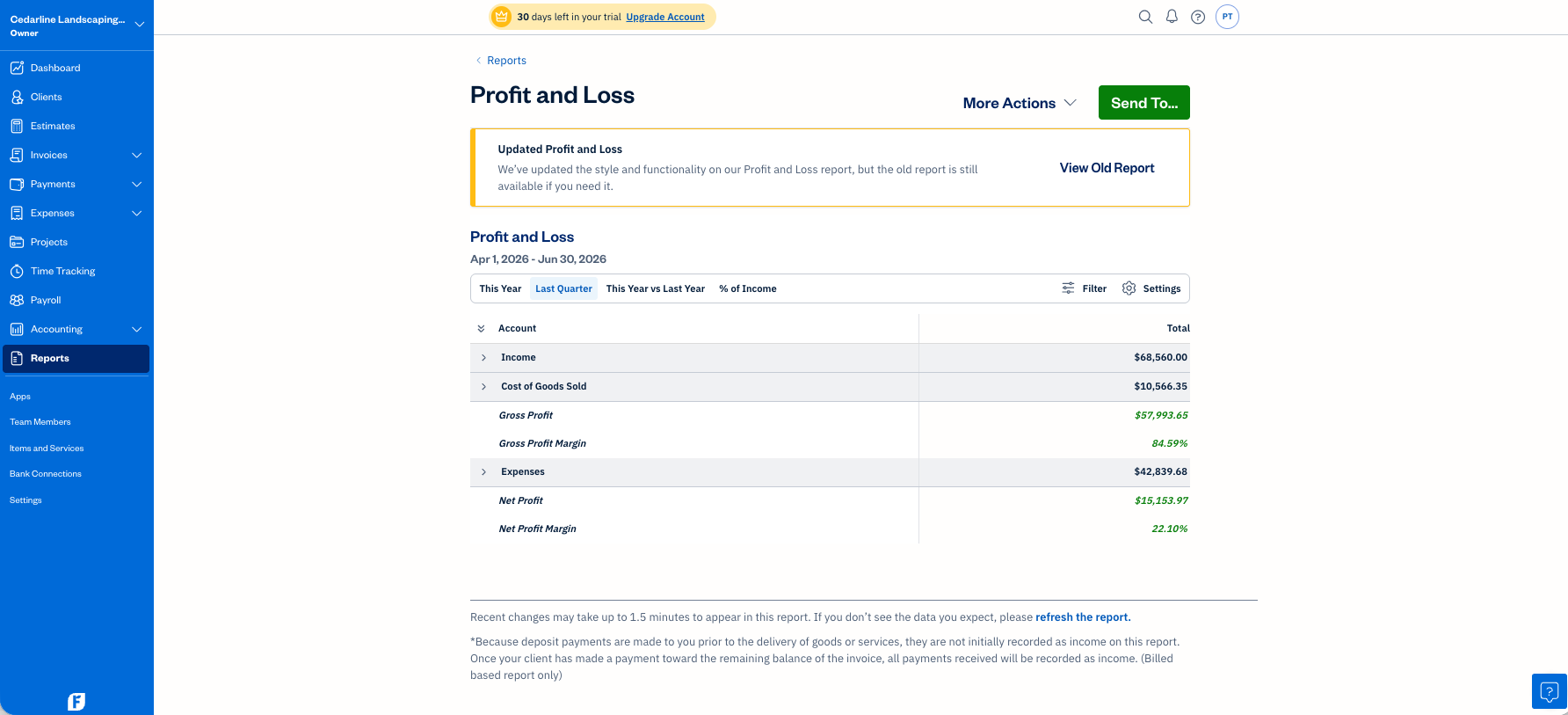
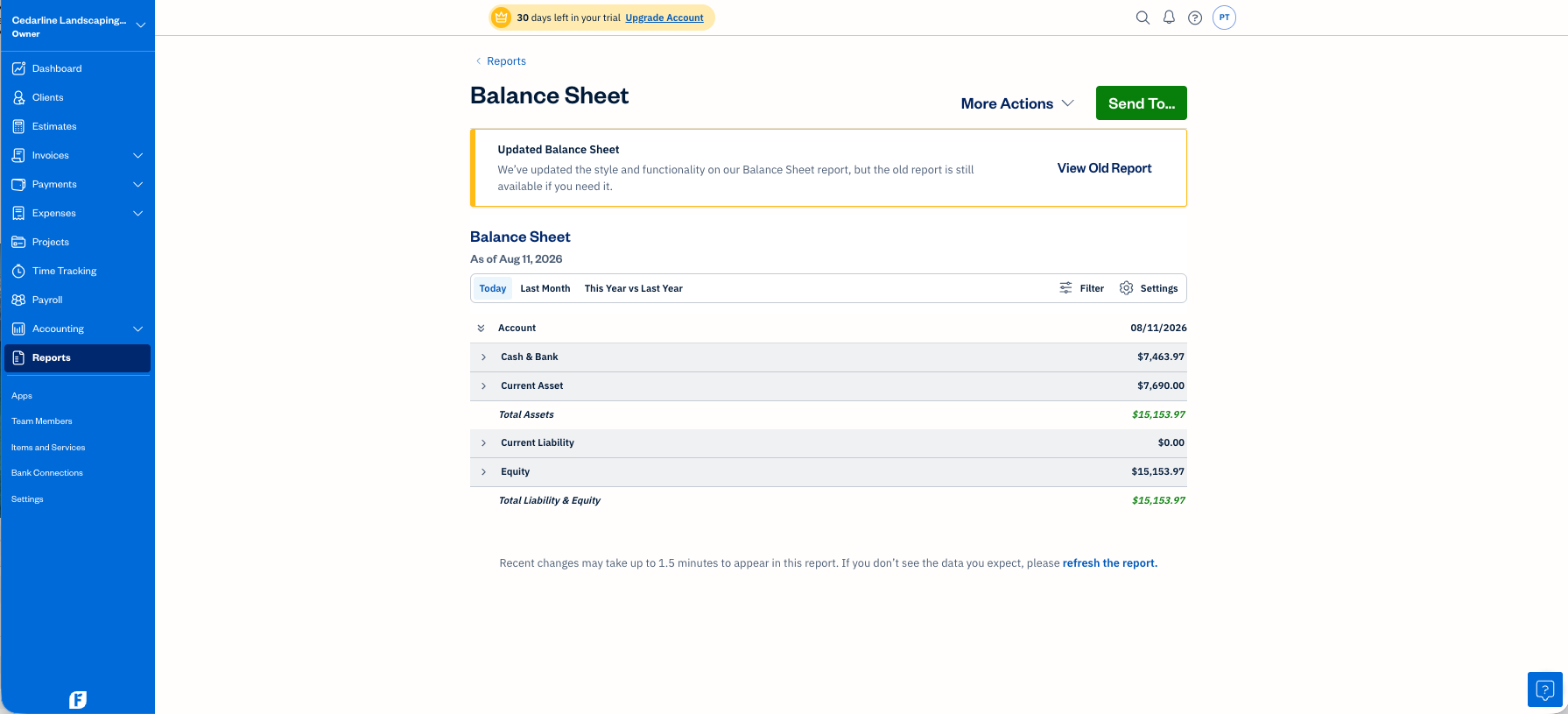
Here’s the fair reading: for an actual freelancer client, every one of these walls is invisible. No company card means no transfers. No equipment loan means no liability to misplace. Draws-as-expense is wrong but consistent, and their accountant adjusts at year-end. The walls only exist for businesses FreshBooks was never built to hold — the mistake is putting those businesses on it, and the bookkeeper’s job is knowing the boundary.
The rest of the checklist, briefly
- Uncategorized done right: FreshBooks treats uncategorized expenses as a first-class, visibly-flagged state — our unidentifiable mystery vendor sat honestly parked, no workaround needed. Better ergonomics than either major platform for the ask-the-client pile.
- No reconciliation without a bank feed: our test’s two-week bank-feed gap — which QuickBooks at least signaled with an unexplained difference — cannot even be noticed in a manual-import FreshBooks workflow. There is no completeness check of any kind. If your source data is incomplete, FreshBooks will never tell you.
- No automation on imports: no category suggestions, no rules. Nothing guesses (so nothing guesses wrong — QuickBooks fabricated ~15 wrong categories on the same data), but the manual categorization relies on genuinely good bulk tooling: search, multi-select, change-category, create-category-in-flow with proper COGS/Operating types.
- Every date field defaults to today — payment dates, income entries. For backdated bookkeeping (i.e., all bookkeeping), that’s a trap on every single entry. Stay caffeinated.
- The accountant seat is the best-documented of the three: a dedicated, free “Accountant” role, labeled for professionals, with a per-module permissions panel that actually tells you what it can and can’t touch.
Scores
| FreshBooks (Plus) | QuickBooks (Essentials) | |
|---|---|---|
| Import & setup (8) | 6 | 6 |
| The five traps (10) | 6 | 4 |
| Everyday work (8) | 1 | 6 |
| Reports & access (6) | 5 | 5 |
| Total (32) | 18 | 21 |
| Full trial, signup → verified reports | 1 h 41 m | ≈ 2 h 10 m |
Read the rows, not just the totals: FreshBooks wins the traps (the duplicate catch and honest uncategorized handling) and loses “everyday work” almost entirely because the checklist’s everyday work — reconciliation, transfers, equity, rules — doesn’t exist in its model. Which is the whole point: the score you should care about is the one for the kind of books your client actually has.
What practitioners say
Sometimes a practitioner describes your lab results before you’ve run them. In an r/Bookkeeping thread, u/Eldi_Clean — who “worked exclusively with service based clients who used Freshbooks” — captured both sides of this comparison from experience:
“Tried to transition a couple to QBO, and none of them kept it. For a non-financial business owner, Freshbooks uncomplicates the whole process with just one spot to enter invoices and one place to list expenses.”
“As a bookkeeper, it was less magical. Reconciliation is almost a hidden feature, and regularly f***s with your P&L when it comes to refunds, fees, and owners draws.”
Read that second paragraph against our findings: reconciliation effectively absent, refunds forcing a grossed-up P&L, owner draws landing in expenses — three of the exact walls our test books hit, named independently by a working bookkeeper. When a lab result and lived practice converge that precisely, you can trust the boundary is real. (Their QuickBooks Online verdict — “I’ve yet to have the automation work correctly to categorize expenses” — also matches the ~15 wrong guesses QBO made on our books before its learning kicked in.)
And the first paragraph is the client-side truth our checklist can’t score: clients stay on FreshBooks because they actually use it. A tool your client genuinely operates beats a better tool they abandon.
Verdicts
Both trials were free; neither vendor knew a review was underway. Affiliate links are disclosed and never touch a verdict. The books behind every claim are downloadable — run them yourself.
Update, October 20, 2026: this review originally called FreshBooks’ manual entry the fastest we had tested. Our later Wave trial entered the same 18 invoices in 13 minutes (FreshBooks took 27 for the invoices plus 15 payments), so we have removed the superlative. The 27-minute timing and the migration math stand as written.
Update, October 23, 2026: since this review was published we have joined Intuit’s referral program for QuickBooks Online, so the QuickBooks link above is now an affiliate link and we may earn a one-time payment if a business subscribes through it. The arrangement did not exist while this review was researched or published, and nothing above has been changed because of it. We have no arrangement with FreshBooks.
Filed under: freshbooks · quickbooks · comparison · bookkeeping software · freelancers