Head-to-head · Bookkeeping
Content Snare vs Ignition: the two halves of client onboarding
We sent one silent client one request through each tool, then did nothing for sixteen days and logged every email. Content Snare published its reminder schedule before sending and hit all five slots to the minute. Ignition re-sent one undisclosed email three times, went quiet, and when its trial lapsed it locked the client out too — with a crash page that names nobody.
Some links below are affiliate links — if you subscribe through one, we earn a commission at no extra cost to you. It never changes a verdict; every tool runs the same test books. Full disclosure
These two tools are sold as the same category and do opposite jobs. Content Snare collects things from clients: statements, receipts, the answer to “what was this $145 charge.” Ignition gets clients to sign things: a proposal, an engagement letter, a payment authorization. A solo practice needs both halves, so we ran both through the same scenario and scored what each one actually did when the client ignored it.
That last part is the whole test. We sent one request to our fictional landscaping client, then had the client do nothing for sixteen days while we logged every email either tool sent, to the client or to us, with timestamps. Content Snare disclosed its full reminder schedule before we clicked send, then hit every one of the five slots on the promised day at exactly 9:00 AM. Ignition showed us no schedule at all, sent the same email three times at three-day intervals, and stopped without saying it would.
Then Ignition’s trial lapsed, and the story changed from reminders to something more consequential: both the client’s proposal link and our own login died the same morning. The client got a generic error page telling them to contact Ignition’s support about their bookkeeper’s proposal. We got a paywall. Neither of us got a warning, an export, or a read-only window. That lockout is also why this review has one score instead of two, which we’ll explain before the numbers rather than after.
How we tested
Same discipline as every review here: a fresh trial of each tool, the same fictional client, scored on a 16-item, 32-point checklist during the trial and never reconstructed afterward. For onboarding tools the scenario is the recurring monthly document chase, not new-client setup, because the chase is the thing a bookkeeper does twenty times a month. One request, “Monthly close documents — June 2026,” asked Morgan Cedarline for three documents and one text answer. In Ignition, which doesn’t collect documents, the equivalent was a proposal for monthly bookkeeping at $450 a month, sent to the same Morgan.
Then the passive test: every default left untouched, and Morgan silent. Whatever arrived in the client inbox or ours was the tool’s own behavior, not our configuration. Content Snare’s arc ran August 16 to September 1. Ignition’s ran August 16 until its trial expired on August 29. A second active session on September 1 walked the client side and the firm side of each tool, which is where Ignition’s story ended early.
Why Ignition gets no total
Six of the sixteen checklist items live on the client’s side of the fence or in the export and handoff step. When we went to test them on September 1, three days after Ignition’s trial lapsed, the client’s proposal link returned an application error and our own login landed on a plan chooser. There was no read-only mode, no grace period, and no export. Anything we hadn’t captured during the August 16 session was gone.
We could have published a score out of 32 with six zeros in it. Next to Content Snare’s complete result, that would have read as Ignition losing on points, when what it actually did was lose on access. So Ignition is a scoped review, the same way our Gusto review was: scores reported only for the nine items we could genuinely test, no total, and the limitation stated here rather than in a footnote. The lockout itself is documented in full below, because it’s worth more to a buyer than the six scores it cost us.
Pricing, verified
Content Snare’s prices were read from its pricing page at signup on August 16, 2026. Ignition’s were read the same day and then re-verified on August 29 inside its own post-login plan chooser, for reasons that become clear later. Neither trial asked for a card.
| Content Snare | Ignition | |
|---|---|---|
| Entry tier | Basic $42/mo ($35 annual) — 20 active requests, 2 users | Solo $49/mo ($39 annual) — 20 clients, 1 user |
| Entry tier catch | Custom branding not included; your client sees the vendor’s logo | Gated to firms under $150k revenue, and requires connecting Xero or QBO AND enabling payments |
| Next tier | Plus $85/mo ($71 annual) — 50 requests, 5 users, branding | Core $149/mo ($99 annual) — 50 clients, 3 users |
| Top standard tier | Pro $143/mo ($119 annual) — 100 requests, 10 users | Pro+ $499/mo ($399 annual) — 600 clients |
| What the tier axis counts | Requests in flight at once | Active clients |
| Free trial | 14 days, no card — 21 if you answer a 3-question survey | 14 days, no card, all features |
Numbers age; the pricing tracker carries the current, dated verification for every tool we test.
Two things to read twice. Content Snare’s axis is active requests, so for a practice it’s roughly “clients you’re chasing at the same time,” which on Basic is twenty. Ignition’s cheap tier is not really a cheap tier: Solo is revenue-gated by self-attestation at signup, and its own pricing FAQ says it also requires a connected ledger and payments switched on. It’s an ecosystem-lock tier at a solopreneur price, and the first plan without strings is Core at $149 a month.
Ignition’s annual toggle is also worth noticing. The Core discount is 34%, far steeper than its neighbors, and the plan chooser defaults to showing annual prices first. That’s the push, and it matters for the email we’ll get to at the end.
The bottom line first
| Content Snare | Ignition | |
|---|---|---|
| Setup & practice fit (8) | 7 | 8 |
| The chase (10) | 7 | 5 |
| The client’s side (8) | 8 | Untestable — client link dead after trial |
| Getting the goods out (6) | 5 | Untestable — firm side paywalled after trial |
| Total (32) | 27 | No total (scoped) |
| Active time, full test | ≈ 32 min + a 16-day passive arc | ≈ 50 min + a 13-day passive arc |
Content Snare’s 27 is the second-highest score any tool has earned in this lab, behind only Double’s 28 on the close checklist. It lost points in exactly three places, and all three are worth knowing before you buy: a template library built for someone else’s tax system, a firm-side email volume that borders on hostile, and two client emails that say less than they should. Ignition’s perfect setup section is real too. Its engagement letter, client records, and pricing intelligence are more sophisticated than anything Content Snare attempts. It just couldn’t stay standing long enough to be scored on the rest.
The chase: one tool tells you, one tool doesn’t
Before you send a request, Content Snare’s Finalize page shows you the entire default communication schedule: five date-triggered reminders and four event-triggered emails, each with its template named and linked.
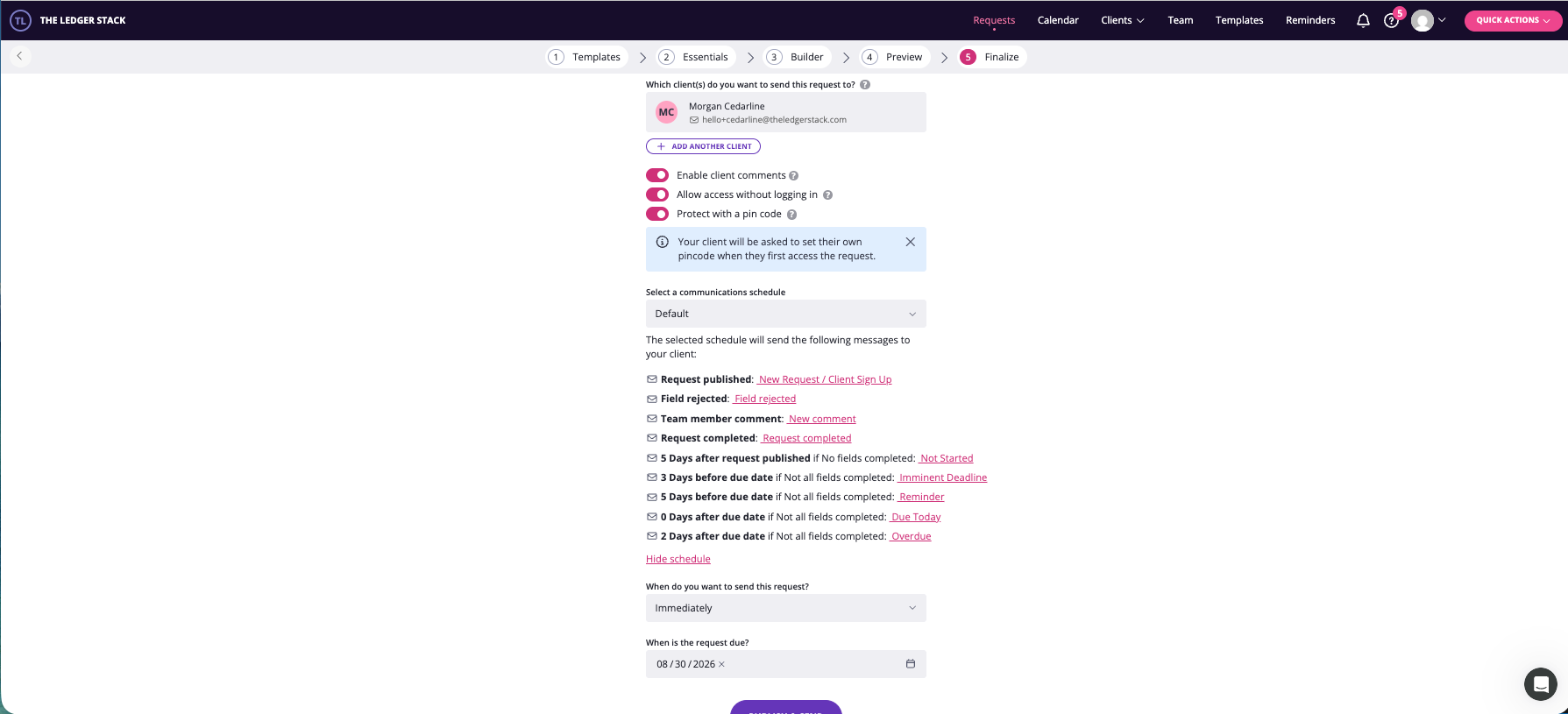
We wrote that schedule down against our August 16 send and August 30 due date, predicted five arrival dates, and waited. Here is what arrived.
| Slot | Trigger | Predicted | Arrived | Register |
|---|---|---|---|---|
| 1 · Not Started | 5 days after publish | Fri Aug 21 | Fri Aug 21, 9:00 AM | Gentle — reasons to start early |
| 2 · Reminder | 5 days before due | Tue Aug 25 | Tue Aug 25, 9:00 AM | Flat — restates the due date |
| 3 · Imminent Deadline | 3 days before due | Thu Aug 27 | Thu Aug 27, 9:00 AM | PEAK — “Urgent!”, “reached urgent status” |
| 4 · Due Today | On the due date | Sun Aug 30 | Sun Aug 30, 9:00 AM | Consequence — “at risk of not being completed on time” |
| 5 · Overdue | 2 days after due | Tue Sep 1 | Tue Sep 1, 9:00 AM | Calm — “you’ve missed the deadline” |
Five for five on the day, five for five at 9:00 AM, five distinct templates. The schedule wasn’t just disclosed, it was accurate, and that alone puts Content Snare ahead of every reminder engine we’ve tested.
The more interesting finding is the shape of the escalation. Most people assume reminders get pushier the longer a client stalls. Content Snare’s don’t. Pressure peaks at slot 3, three days before the deadline, and then drops. The Due Today and Overdue emails state a consequence calmly and stop pushing. Read as design, that’s urgency where it can still change behavior and acceptance once it can’t, and the sequence terminates at a single Overdue email rather than nagging forever.
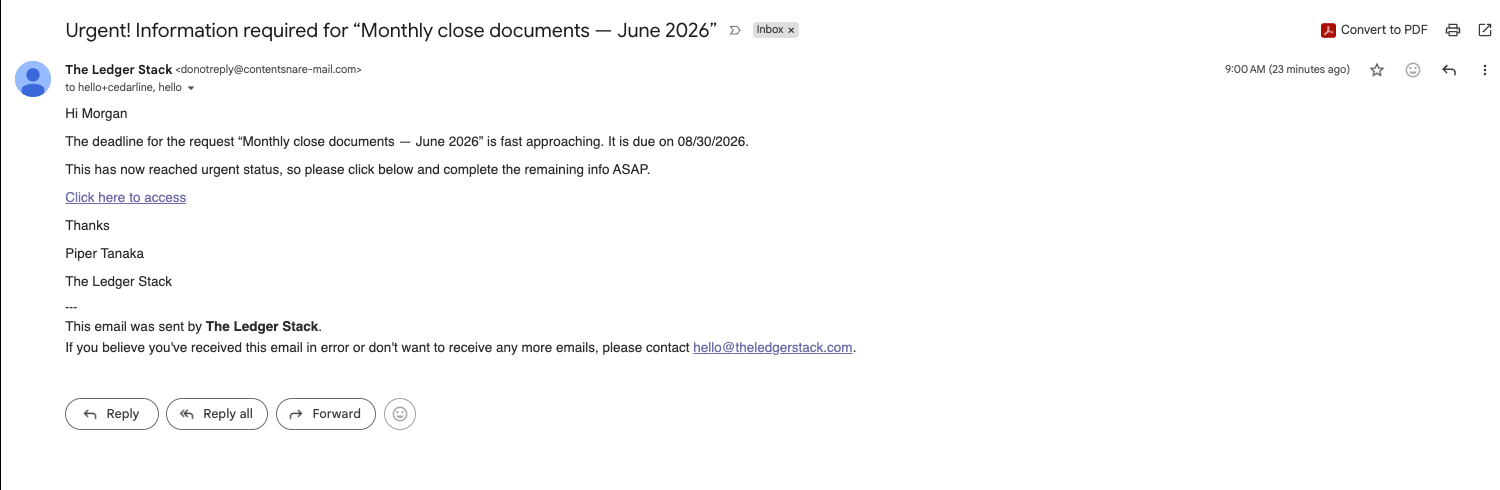
Ignition’s send flow has no schedule page. No reminder settings surfaced anywhere between choosing a template and clicking send. We assumed that meant no automated chase. We were wrong: Ignition sent three.
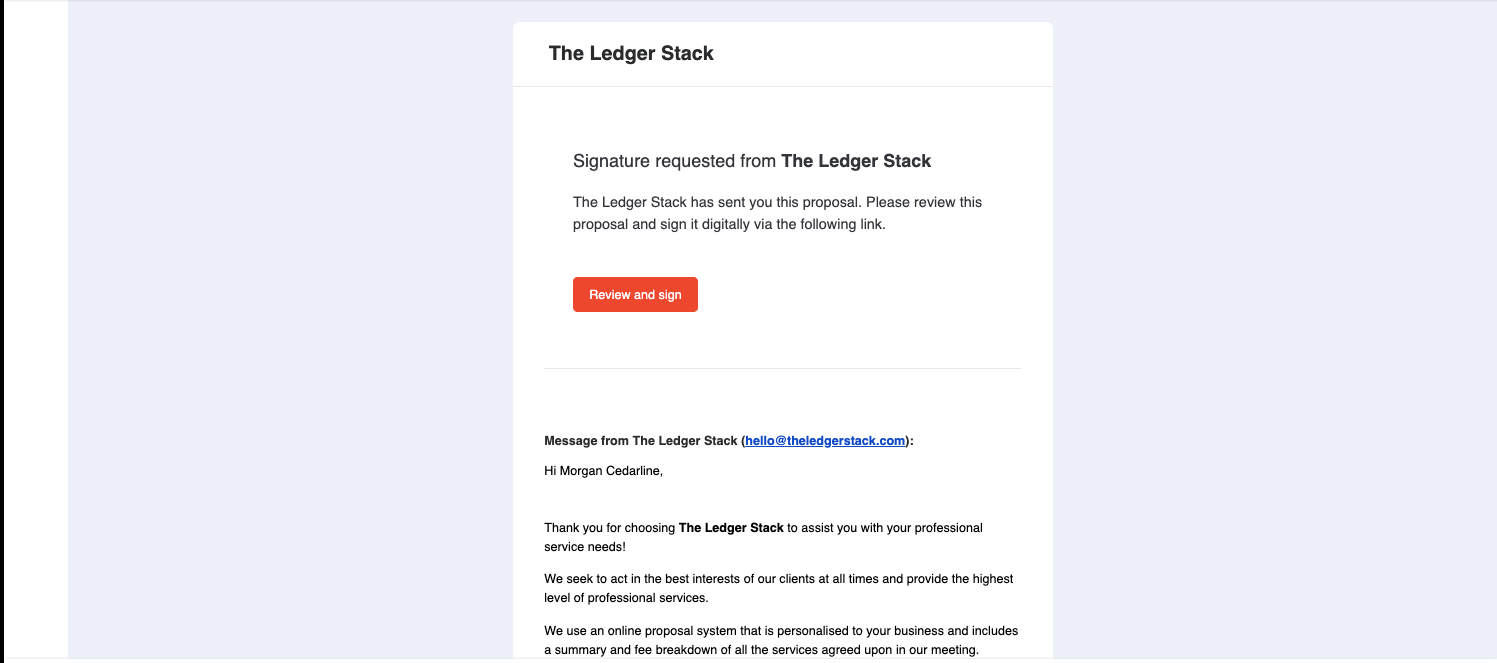
The three chases landed August 19, 22, and 25, a clean three-day cadence we predicted correctly before the third one arrived. Each carried a “Reminder:” prefix on the subject and, below it, the original invite body re-sent unchanged, including a copy bug that reads “Signature requested from The Ledger Stack” when the signature is being requested of the client. No escalation of tone, no acknowledgment that earlier chases were ignored. Chase 3 arrived at 11:01 AM against a proposal sent at 11:28 AM, which points to a clock anchored to send time rather than a fixed morning dispatch. Then a fourth never came. We checked twice on August 28, with the trial still active all day. The sequence had simply ended.
So the fair summary: Ignition sends exactly three chases, three days apart, then stops. That’s a reasonable design. But the firm is never told the count, the interval, or that it terminates, and there was no setting we could find to change any of it. One tool varies its message per trigger and says so up front. The other repeats itself, never says it will, and stops without saying that either.
What the bookkeeper hears
This is where Content Snare gave back most of the points it earned above. For one silent client on one request, over sixteen days, it sent our firm inbox a dozen emails by our count, and its own activity log records eleven deliveries to our address. Two mechanisms compound. Every client-facing send copies the firm, with no opt-out we could find: the invite and all five reminders. And a separate firm-only notification series fires on events, a series the Finalize page never mentioned.
That undisclosed series produced the one genuinely confusing moment of the test. At 9:00 AM on the due date, Content Snare sent two emails about the same request in the same minute. The client’s said the work was due today. Ours said it was already overdue.
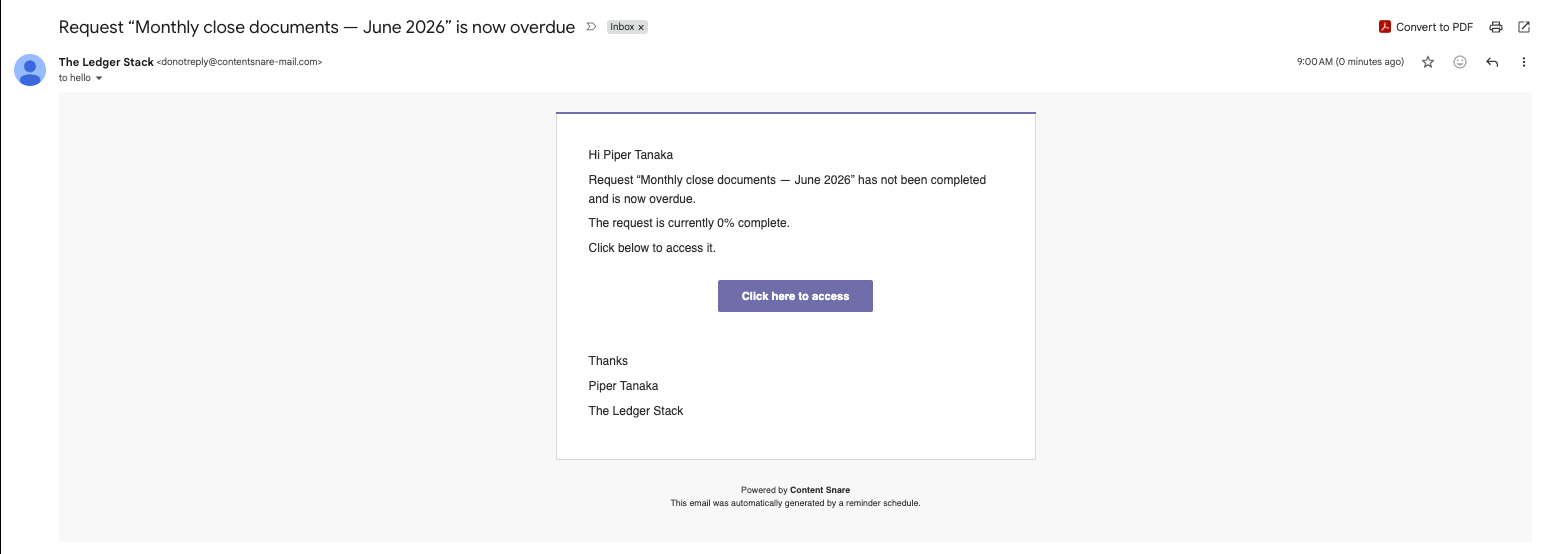
By the tool’s own disclosed schedule, Overdue is slot 5, two days after the due date. The firm notice fires a day early against the product’s own definition. Then the active session added five more emails in an afternoon: a “requires review” alert when the client submitted, a copy of the client’s comment, a copy of our own reply to that comment, a field-rejected notice, and a request-completed notice. Being emailed a message you just wrote is the least defensible of these. Extrapolate to twenty clients on a monthly close, each with one question and one rejection, and you’re past two hundred emails a month.
Ignition sent the firm exactly one email in thirteen days, and it wasn’t about the client at all. We’ll come back to it. Low firm-side noise is a genuine point in Ignition’s favor, and the reason it scores a 2 where Content Snare scores a 0. The catch is the asymmetry: Ignition had no trouble reaching us about money on the day the trial expired, having never told us anything about the three chases it sent our client. The billing channel works. The transparency channel doesn’t exist.
The client’s side of the fence
Only Content Snare could be scored here, and it earned all eight points. This was the strongest single showing of either tool.
Access is a magic link with no account and no password. On first visit the client sets a four-digit PIN, which is then required. The gate explains itself in one sentence and puts a “how we keep your data safe” link at the exact moment a landscaper is being asked for bank statements.
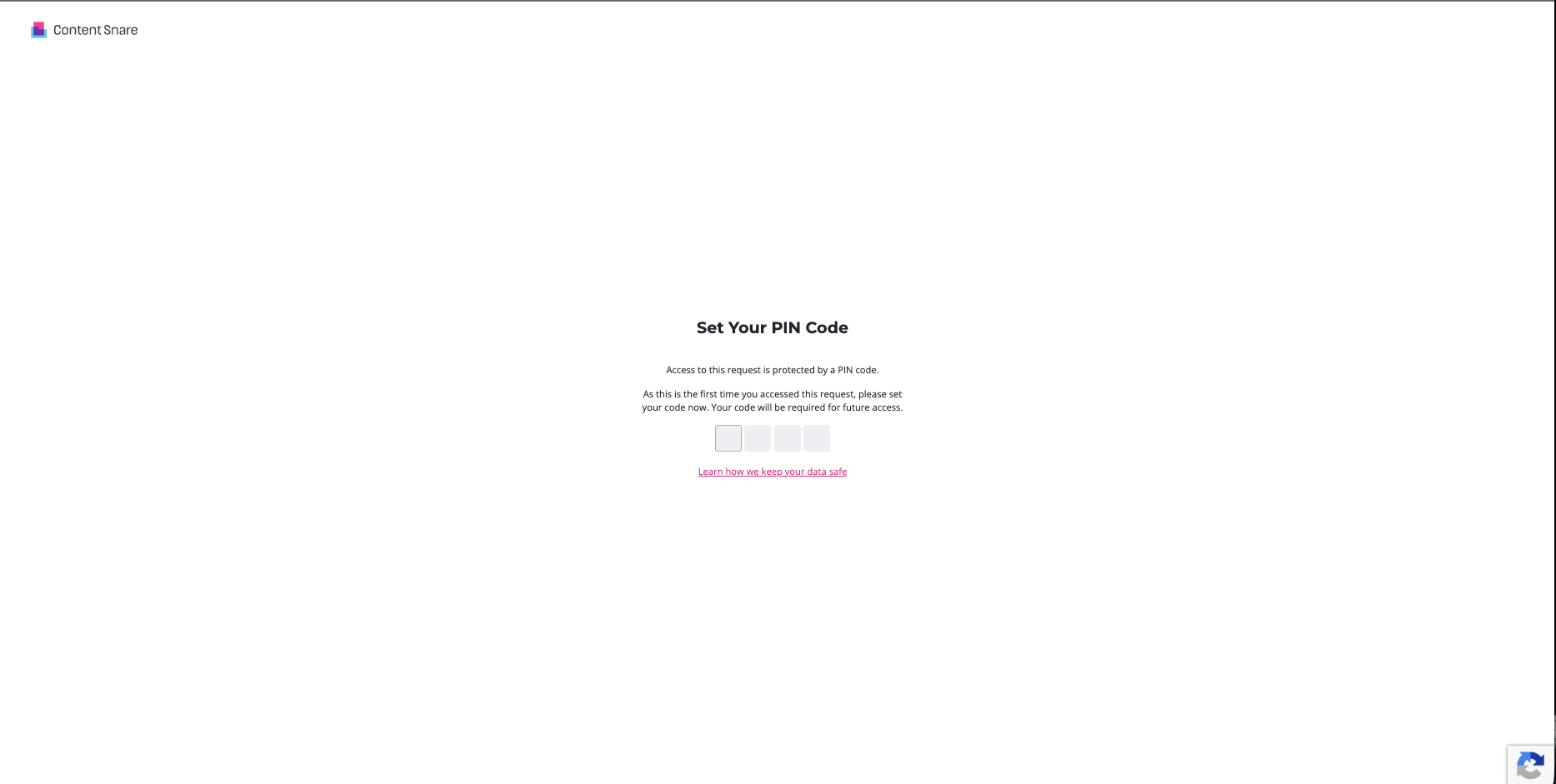
Inside, an instructions page teaches the model before asking for anything: autosave, submit each answer for review, treat it as a checklist. Progress is nested everywhere. The active question is elevated and the rest greyed. Submitting auto-advances, and a submitted answer becomes “Revise” rather than locking. The client can see the overdue badge and the due date themselves. Uploads offer download and preview back to the client so they can check what they sent. And the question channel closes in both directions by email with the full text: Morgan asked about the $145 mystery charge, we were notified in five minutes with the question in the body, our reply reached Morgan the same way. There’s even an internal-notes toggle on the same thread so a firm can annotate privately, which nothing in the send flow disclosed.
One flaw, and it’s a real one. The instructions promise you can submit an answer “even if it’s N/A,” but file fields have no N/A control. Submitting an empty answer is accepted and ticks green, identical to a real upload.
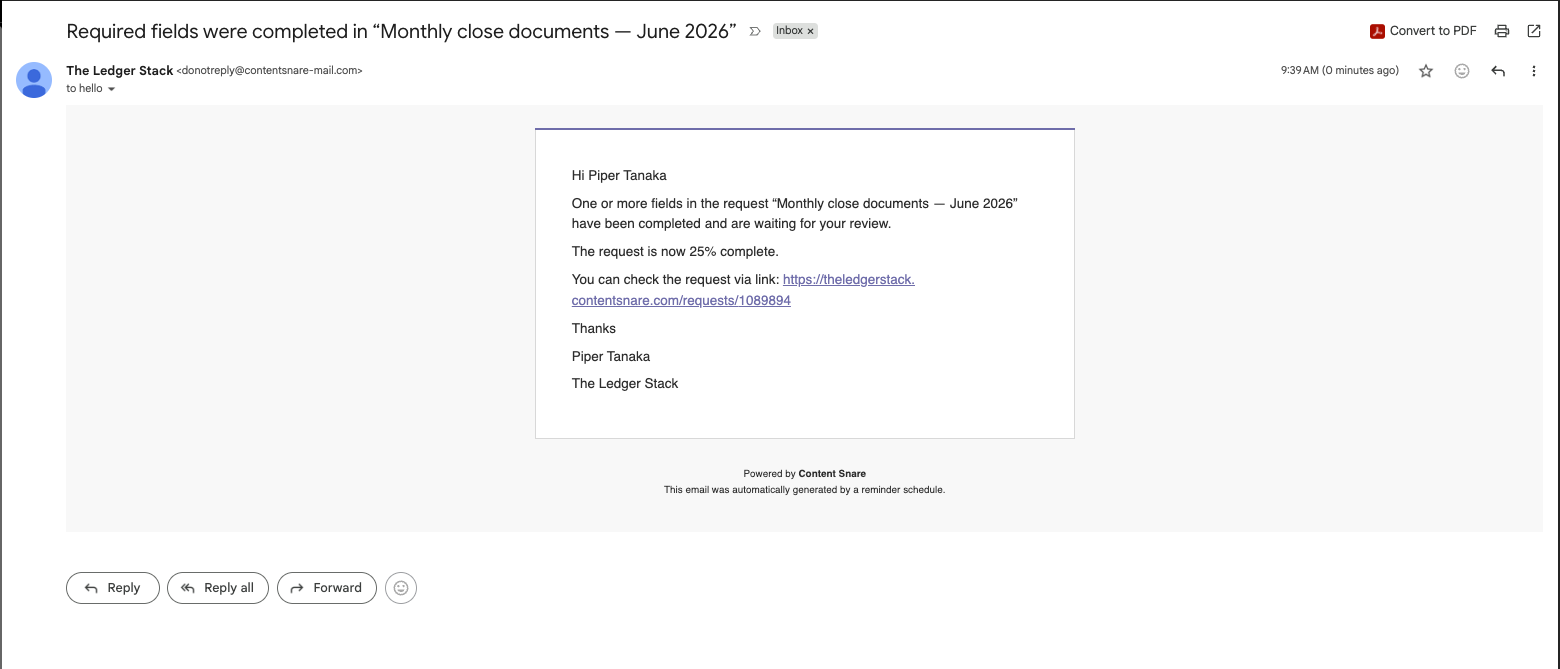
Both the client’s page summary and the firm dashboard counted that empty answer as complete. The only surface that told the truth was the export, which printed “No answer given” under it. So the data is honest and both dashboards aren’t. Relatedly, the “PDF preferred” wording on our statement field was a preference, not a restriction: Morgan uploaded a CSV and nothing stopped it. Per-field type restriction exists in the builder, but you have to switch it on.
For contrast, Ignition’s client never got in. Not because the flow was bad, but because by the time we walked it, the link was dead.
Getting the goods out
Content Snare’s review loop is excellent in the app and weak in the email. Rejecting an answer requires a message explaining why, and the dialog says so. You cannot reject silently. The reason lands inline on the field and in the comment thread, counts adjust, the client sees “requested changes” rather than “REJECTED,” and it’s reversible. Then the notification goes out:
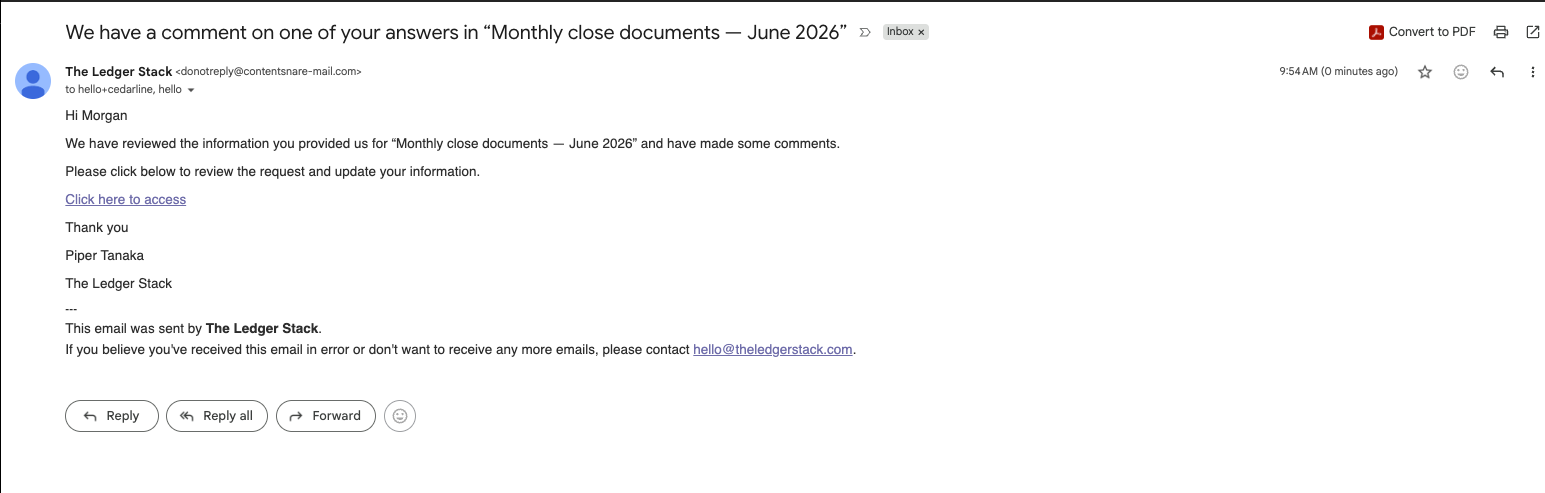
It doesn’t name the field and doesn’t include the reason the tool just made us write. A lower-stakes general comment arrived with its full text; the higher-stakes “do this again, differently” arrives vaguer. That’s the lost point.
The other email problem is stranger. When we closed the request from the firm side, with two of four items genuinely done, Content Snare thanked Morgan for “completing everything in your request.”
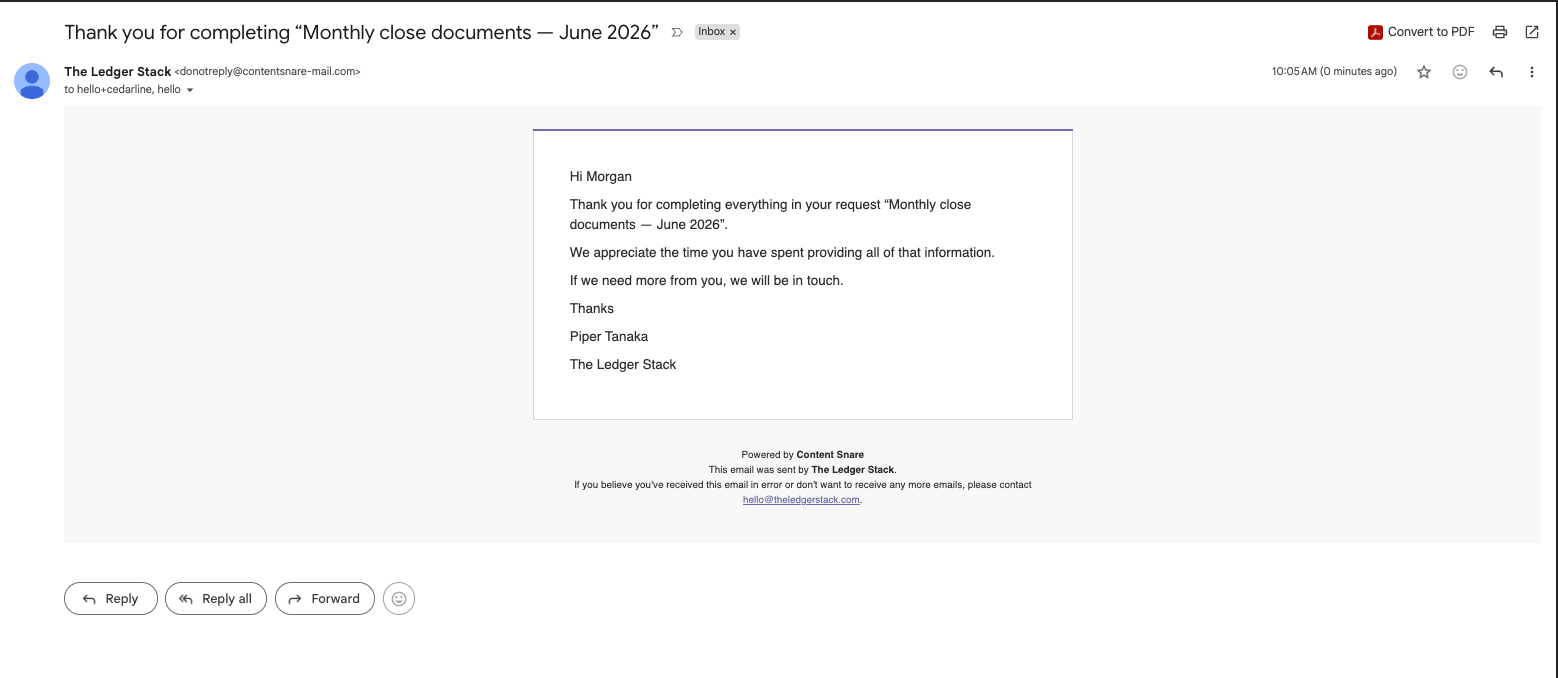
Closing a partial request because the month has to close is an entirely normal thing to do. The template assumes completion means the client finished, and thanks them for information they never provided.
Export, by contrast, is the most honest surface in the product, and the direct counterpoint to what Ignition did at trial end. Six formats: PDF, Word, HTML, plain text, CSV, and JSON, which means the data is programmatically reachable, not merely printable. Attachments come with it, optionally renamed for the question they answer. The summary PDF tags each item done, redo, or to-do and prints “No answer given” where nothing was given.

The activity feed in that export is also how we can name Content Snare’s
undisclosed firm-side emails precisely: Request not completed (internal), Request requires review (internal), New comment (internal). The vendor’s own audit trail evidenced the noise we’d been
counting by hand.
Team roles round it out: four graduated roles on the entry tier (Administrator, Editor, Reviewer, Viewer), where most tools at this price offer admin-or-member. Reviewer maps to a real bookkeeping workflow, a junior collects and a senior approves without being able to restructure the request. The limit is the seat count: Basic caps at two users, so a third person means Plus at $85 a month.
A practice tool, not a form tool
The thing that lifted Content Snare’s setup score from good to strong came late in the test, when we opened the Clients page.
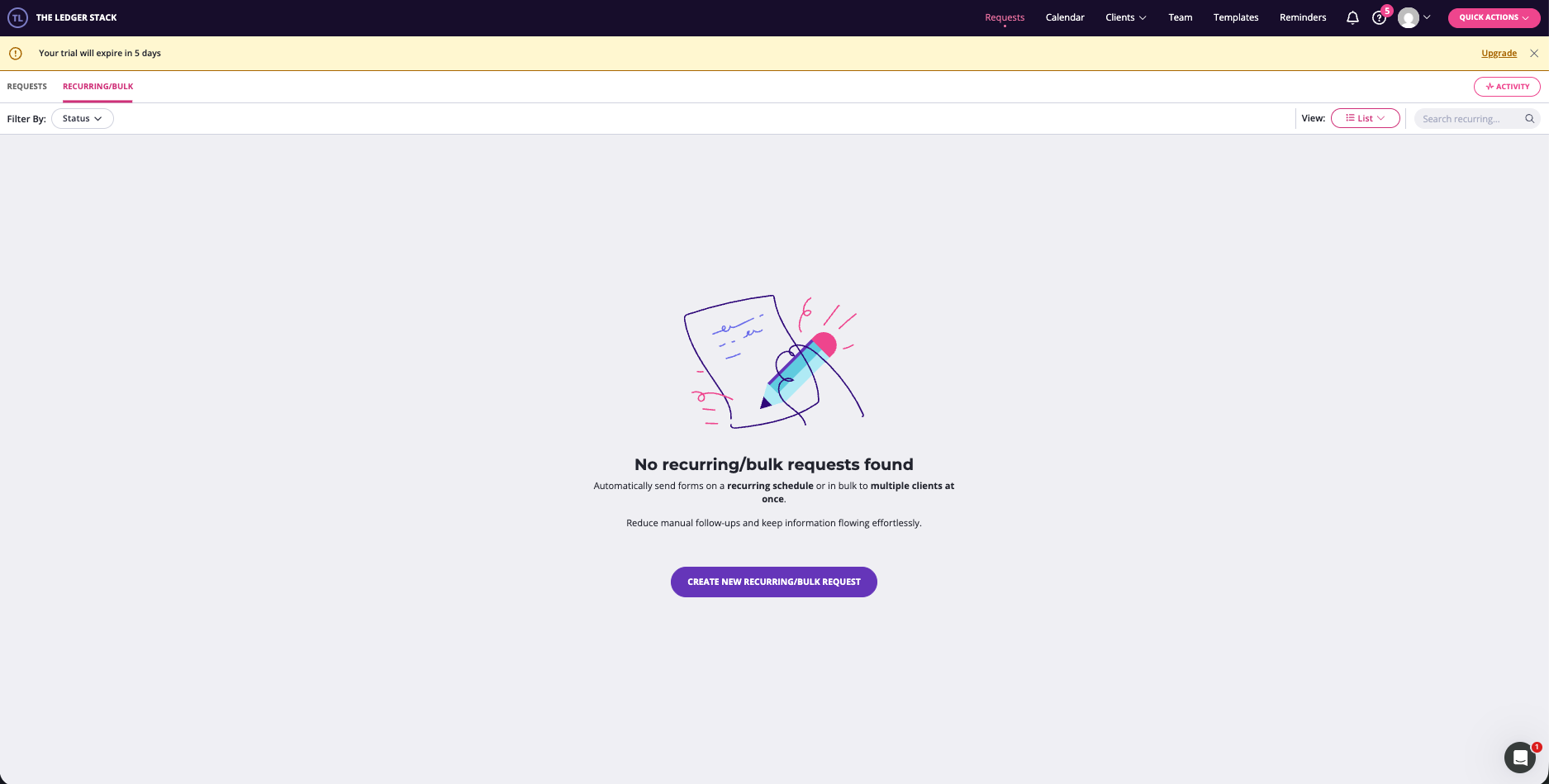
Clients are records with history, active and archived states, and a bulk import. Every request for a client sits under that client. And recurring plus bulk sending both exist on Basic: build the monthly-close request once, aim it at many clients, generate it on a schedule. That is the single most commercially relevant feature for this niche, and it’s on the cheapest plan.
The point it lost on fit is the template library. There’s a dedicated Bookkeeping category, and it’s onboarding-only: four intake forms and two Xero setup questionnaires, no QuickBooks equivalents, and no monthly-close template at all. The every-month chase, the tool’s core loop for a bookkeeper, has to be built from scratch. And the wider library leans heavily Australian: ATO client-agent linking, FBT, SMSF setup, trusts. Content Snare is an Australian company and the shelf shows it. A US bookkeeper gets a strong tool with a template library partly built for someone else’s tax system. Worth knowing, not disqualifying, and the Smart Creator softens it: one plain-English sentence produced four correctly typed fields with sane client-facing helper text, the best AI-assist showing of any tool we’ve tested. (Double’s AI was out of credits on a fresh trial.)
What Ignition is actually for
Now the half Content Snare doesn’t do. Ignition’s setup section scored a perfect 8 because everything in it is built for a practice, not adapted to one.
Picking “Bookkeeping” at signup seeded twenty-two pre-priced services with real scope text, a proposal-template library with bookkeeping variants and current US compliance work (1099 prep, BOI filing), and client records that are a genuine practice CRM: contact roles that drive e-signature, lifecycle states, business structure and tax registration fields, client groups, partner and manager slots. Building a proposal was a six-step wizard we finished in one sitting, with per-line billing modes, an annualized-value readout, and a terms editor that’s a real templating engine.
The AI price insight deserves its own paragraph. Asked about our $450 monthly bookkeeping line, it returned thirty-five comparables, three named tiers, and three pricing options. Its Conservative suggestion of $475 landed within $25 of the $450 we’d derived independently in our pricing article, which is a useful corroboration from a source with no reason to agree with us.
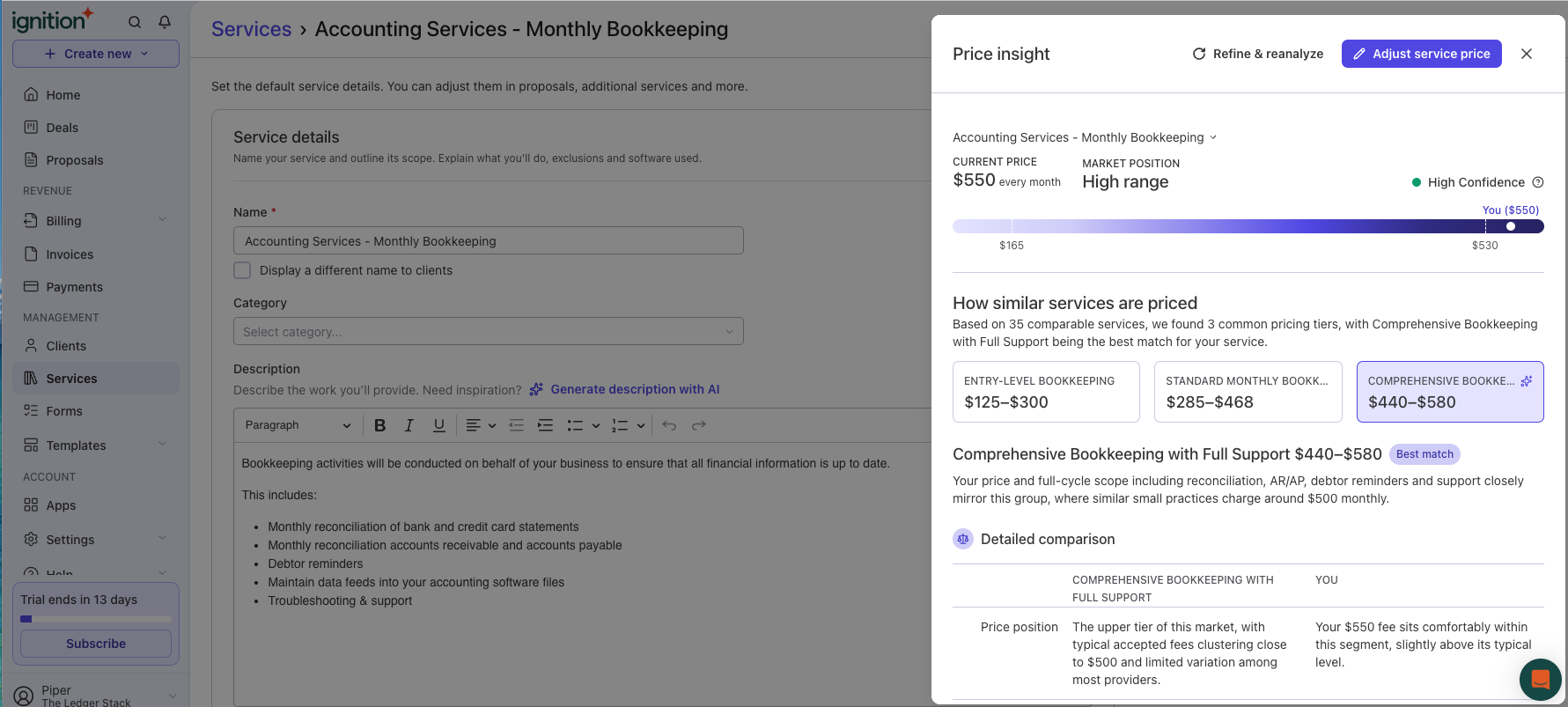
Two caveats. The result took five-plus minutes with a loading drawer stuck on “Almost there…” while the answer had quietly landed inline, and the source of those thirty-five comparables is never stated. And its advice skews upward, toward advisory add-ons and higher fees, which is what a platform paid on payment volume would say.
The engagement letter is a real one: scope limited to listed services, change orders need a new signature, seven-year retention, a satisfaction guarantee. Reading it closely found four defects in a US-configured account: “applicable provincial sales tax,” a merge-field sentence reading “This engagement starts on On Acceptance,” a broken indemnity clause missing the word “agree,” and firm-favorable defaults (a 300%-of-fees liability cap, one-way indemnity) with no have-a-lawyer-review note anywhere. Australian roots again; MYOB was a ledger option at signup.
One more thing we didn’t test, deliberately. Enabling any client payment method in a proposal opens an identity-verification gate. Our fictional firm cannot pass KYC and we won’t fake it, so proposals went out with payments off, which the product allows. The boundary itself is the finding: you can send with Ignition without verifying, but you can’t get paid through it.
What happens when the trial ends
On August 29, the day Ignition’s trial expired, our firm inbox received its one and only email of the thirteen-day window.
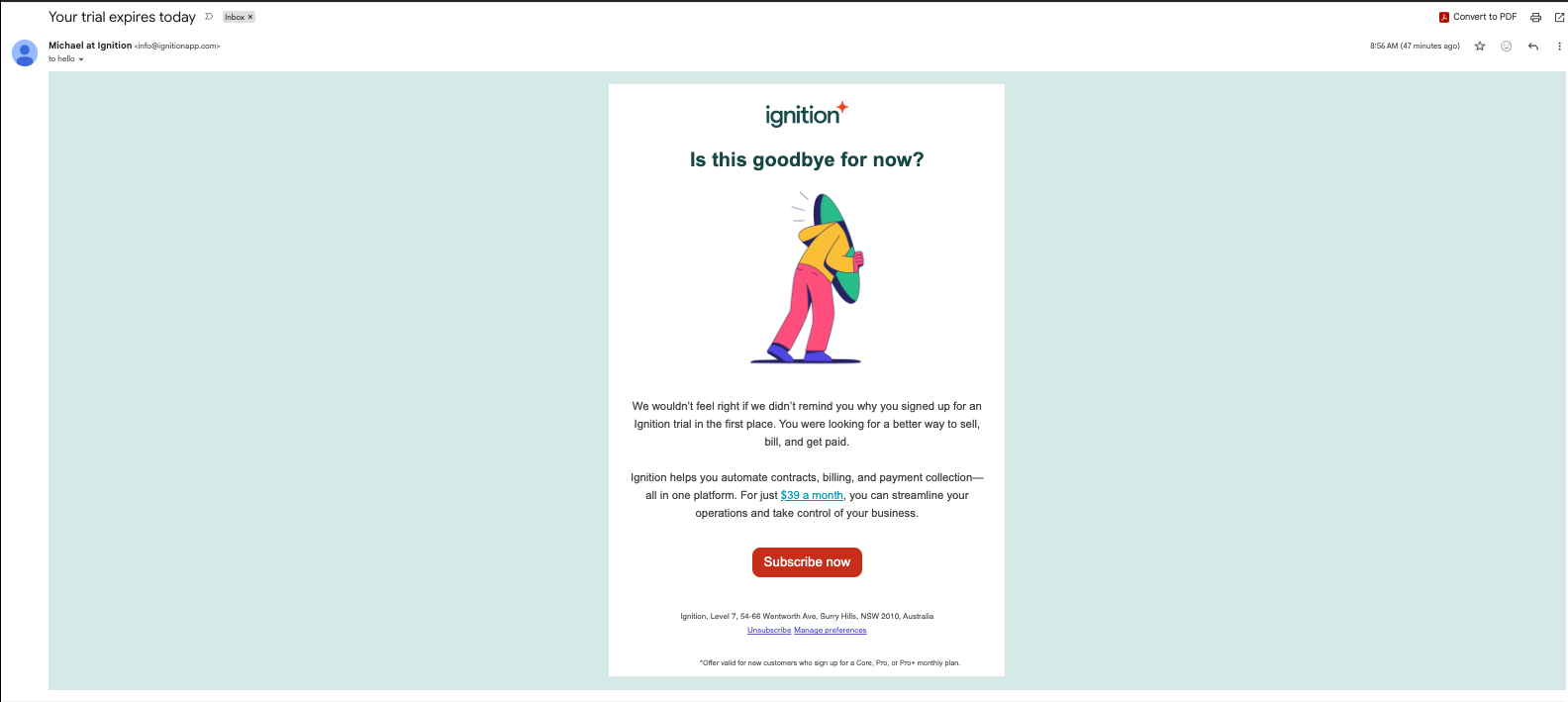
The headline says $39 a month. The footnote says the offer is valid for Core, Pro, or Pro+ monthly plans. We verified in Ignition’s own plan chooser that $39 is the Solo tier billed annually, which the footnote excludes twice over. The cheapest plan the offer actually covers is Core monthly at $149, 3.8 times the advertised figure. The link goes to a sign-in with our address prefilled, for an offer footnoted as being for new customers. Every one of those facts is checkable and none of them resolve into a price a reader could pay.
Three days later we opened the client’s proposal link for the first time, as Morgan.

This isn’t a graceful expiry. There’s no “this proposal is no longer available,” no branding, no mention of the firm that sent it. The client is told to contact Ignition’s support about a proposal from their bookkeeper. Our side, checked the same hour:
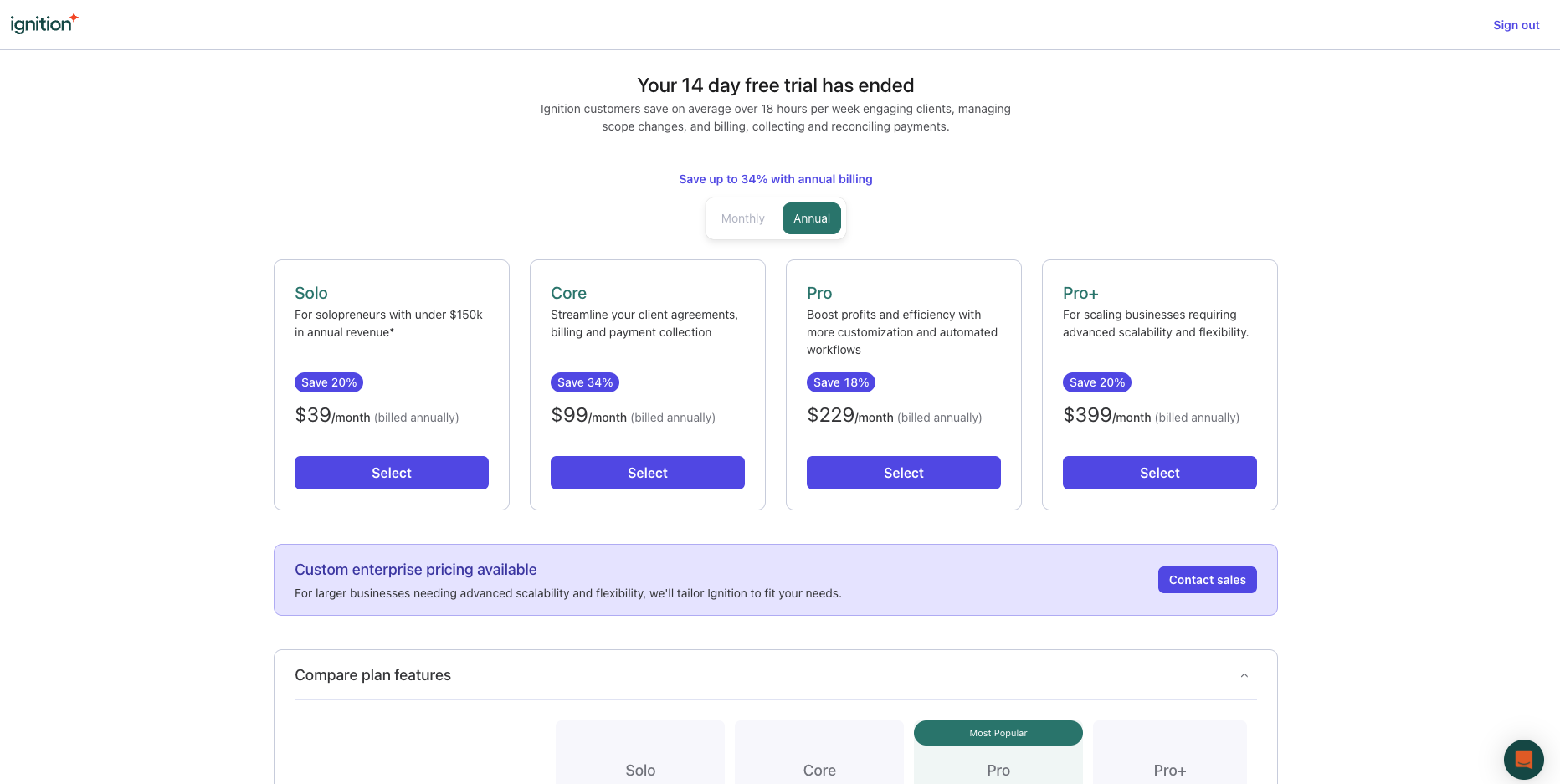
So both sides of a sent proposal die at trial end. The firm can’t open the record, can’t see whether it was viewed, can’t retrieve what it sent, and can’t reach the client through the tool. The commercial logic is obvious, the Select button is the way back in. But the cost lands on the client, who never signed up for anything, and on the firm’s relationship with them, and the firm was never told this would happen. Of every trial we’ve run in this lab, including the card-fused ledgers that could actually charge us, this is the harshest ending.
Content Snare’s trial expired on September 6, and we walked the same three doors. Two days earlier it had sent a warning email, from a co-founder’s address, whose only content was a Matrix-themed pitch and a setup bonus for upgrading to Plus or above. Nothing in it said what expiry would do. Here is what it did.
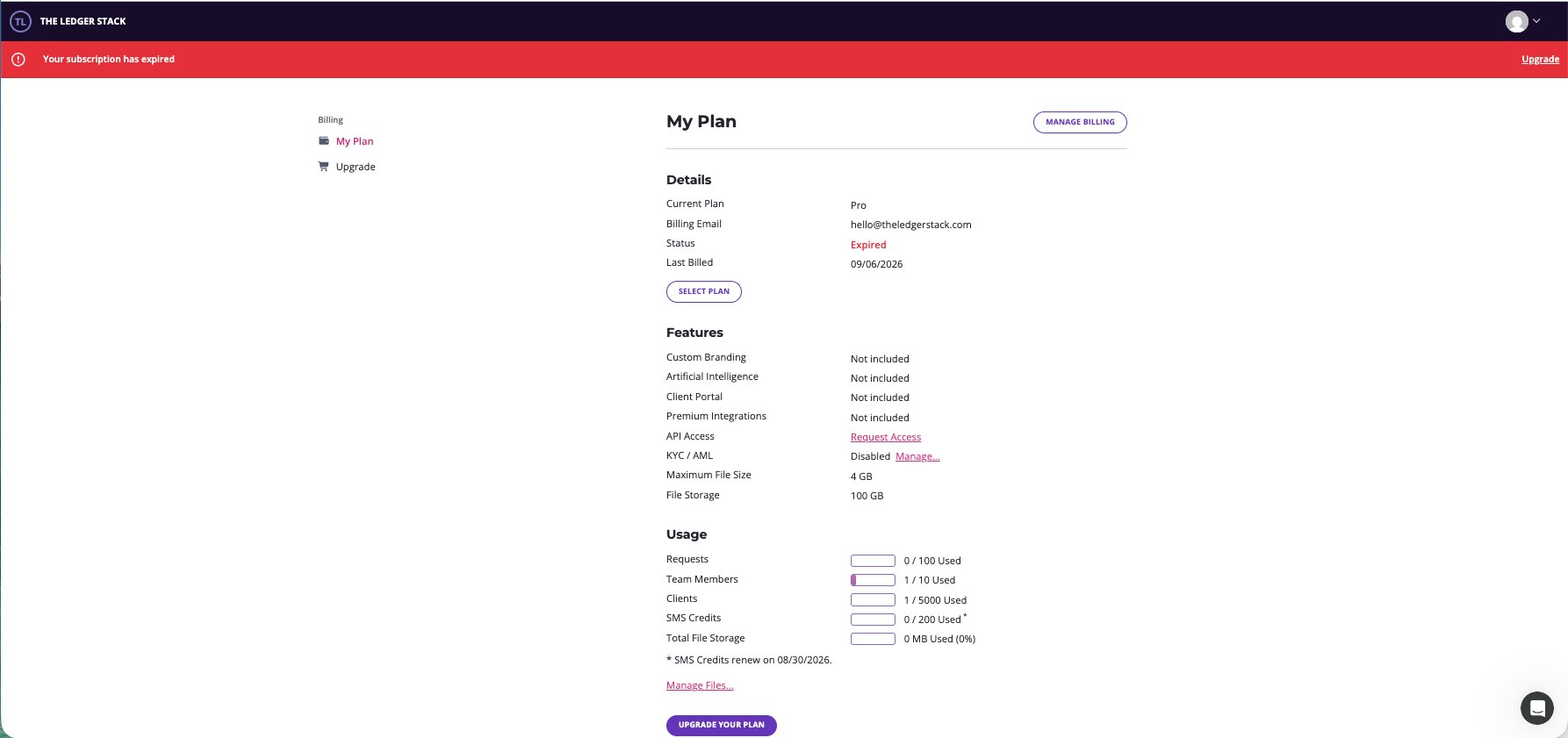
The firm side is a wall. Signing in lands on the billing page under a red “Your subscription has expired” banner, with the navigation stripped out. The usage block still counts your client, your team member, and your storage, so the account is visibly intact. It just isn’t reachable. Request links from the notification emails redirect to the same billing page. The one link left on it, “Manage Files,” throws a “Session Expired” screen and logs you out, and did so again on a fresh login. There’s no export window, no read-only mode, and nothing on the page says how long the data is kept. On expiry day itself the only email we received from Content Snare was a tips piece about handling difficult clients.
The client side is humane. Morgan’s link from the reminder emails opens a clean page: “Request not accessible. This request is no longer accessible as it has been completed. Please contact the company that sent you the link if you require access.”
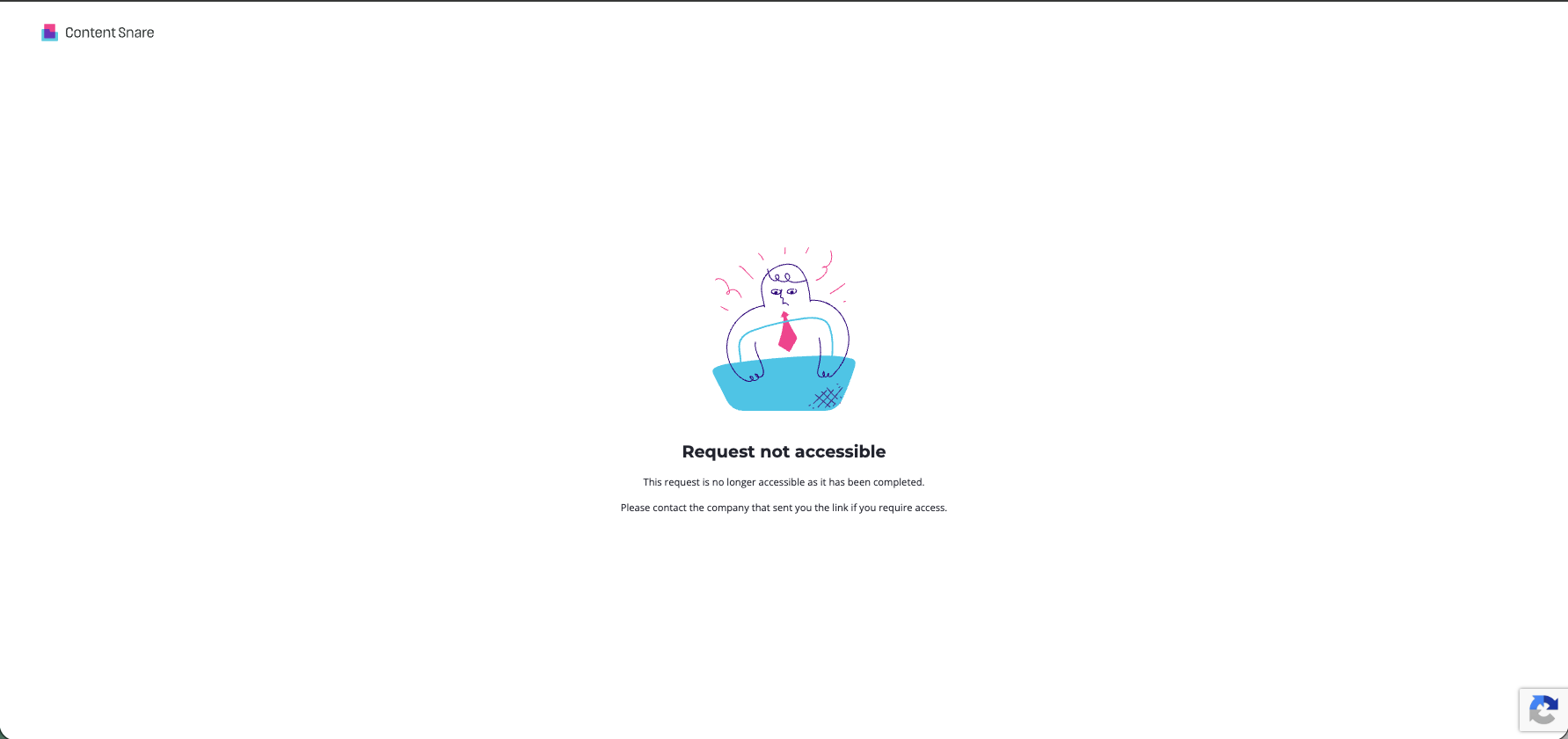
That’s everything Ignition’s client didn’t get: a reason, no error code, and a pointer back to the firm rather than to the vendor’s support desk. One honest caveat. The reason it gives is completion, and that’s accurate, because we closed this request from the firm side on September
- An expired account can’t send a new request, so what a client sees on a request that’s still open when the trial lapses is the one thing we couldn’t test.
So the two tools fail differently. Ignition took both sides down. Content Snare takes the firm side down completely, with no stated retention and a broken link where an export should be, but leaves the client with a page that reads like it was written by someone who’d thought about them. Neither told the firm, by email, that any of this had happened.
Verdicts
The stack advice: these aren’t alternatives, and a solo practice that needs both should know the order. Start with Content Snare, because the monthly chase is the recurring pain and Basic covers it, branding aside. Add Ignition when engagement letters and payment collection become a bottleneck, and treat its trial as a decision rather than an experiment: send nothing to a real client from a trial account you might let lapse.
Both trials were free and card-free; neither vendor knew a review was underway. Since this review was published we have joined both companies’ programs. We are promoting Content Snare as part of an affiliate agreement and may earn affiliate commissions on your purchase, and Ignition pays a one-time bounty if you sign up for a paid plan through our link. Neither arrangement existed while this review was being researched or scored, and neither has changed a word of it. Affiliate links are disclosed and never touch a verdict. Our test books are downloadable; send the same request to the same silent client and check our work.
Filed under: content snare · ignition · client onboarding · document collection · engagement letters · comparison