Tool review · Bookkeeping
Double (formerly Keeper): the month-end close, tested
We pointed the close tool formerly known as Keeper at a reconciled quarter with a planted mystery, a pile of unapproved drafts, and $7,690 of aging — then played both bookkeeper and client. It found the needle in minutes, ran the best client-question loop we have seen, and went blind in two specific places.
Every tool we’ve tested so far holds the books. This one watches them. Double — the month-end close tool that was called Keeper until its late-2025 rebrand — connects to a client’s QuickBooks or Xero file and runs the review layer on top: what’s uncoded, what’s inconsistent, what needs the client’s memory instead of the bookkeeper’s judgment. So we tested it the only way that means anything: we pointed it at our standard test company’s already reconciled quarter, into which we had parked exactly the mess a close exists to find — a $145 mystery charge waiting in an “Ask the Client” account, thirteen unapproved draft bills, and $7,690 of aging receivables — and then played both sides of the desk, bookkeeper and client.
The result is the highest score of any tool we’ve tested: 28/32 on our close-tool checklist — including a perfect run on the part that matters most, the client-question loop, which went from found the mystery to client’s answer attached to the transaction in about four minutes. It also has two genuine blind spots and a noisy first day, and at $10 per client per month, all of it — the brilliance and the blindness — is unusually cheap to find out about yourself.
How we tested
Fifty-five minutes, signup to fully scored — the fastest trial we’ve run, because a close tool needs no data entry: it mounts on the ledger you already have. Our Xero org arrived reconciled to the penny (the same books from our core-ledger reviews), pre-baited with honest open items rather than planted traps: the K PLM mystery parked at $145 in a “6999 – Ask the Client” account, ~13 draft bills left in accounts payable by our receipt-capture trials, and three legitimately unpaid invoices aging at $7,690. We scored sixteen items across setup, finding the open items, the client-question workflow, and output — every score with a screenshot. And per our standing rule, nothing was approved or written back to the ledger: the books came out exactly as they went in.
Pricing, verified
Prices from the pricing page and signup, August 15, 2026. No card demanded; the 15-day trial simply lapses.
| Core | Plus | Scale | |
|---|---|---|---|
| Price per connected client | $10/mo | $25/mo | $50/mo |
| Users | Unlimited | Unlimited | Unlimited |
| Client minimum | None | None | None |
| At 5 clients | $50/mo | $125/mo | $250/mo |
Numbers age; the pricing tracker carries the current, dated verification for every tool we test.
Three things to like and one to know. No client minimum — a solo bookkeeper with three close-worthy clients pays $30, where Dext’s practice tier demands a ten-client, $239/month floor. Unlimited users on every tier. Mix-and-match per client — the simple client rides Core while the complex one gets Plus. The thing to know: the self-serve trial exists specifically for small firms — the signup form routes practices with more than nine clients to a sales demo. Double self-serves the little guys and sales-gates the big ones, which for our readers is the right way around.
The scoreboard
| Section | Score |
|---|---|
| Setup & practice fit (8) | 8 |
| Finding the open items (10) | 6 |
| The client-question workflow (8) | 8 |
| Output & practice fit (6) | 6 |
| TOTAL (32) | 28 |
Twenty-eight is the best result this site has ever recorded — with the caveat that each tool category gets its own checklist, so this is “best at its own job,” not “better than Xero.” The two sections it swept and the one it didn’t are the whole review in miniature.
The needle test
The first thing we did after connecting was nothing. We just looked at what Double had found on its own — because the entire premise of a close tool is that it looks for you.
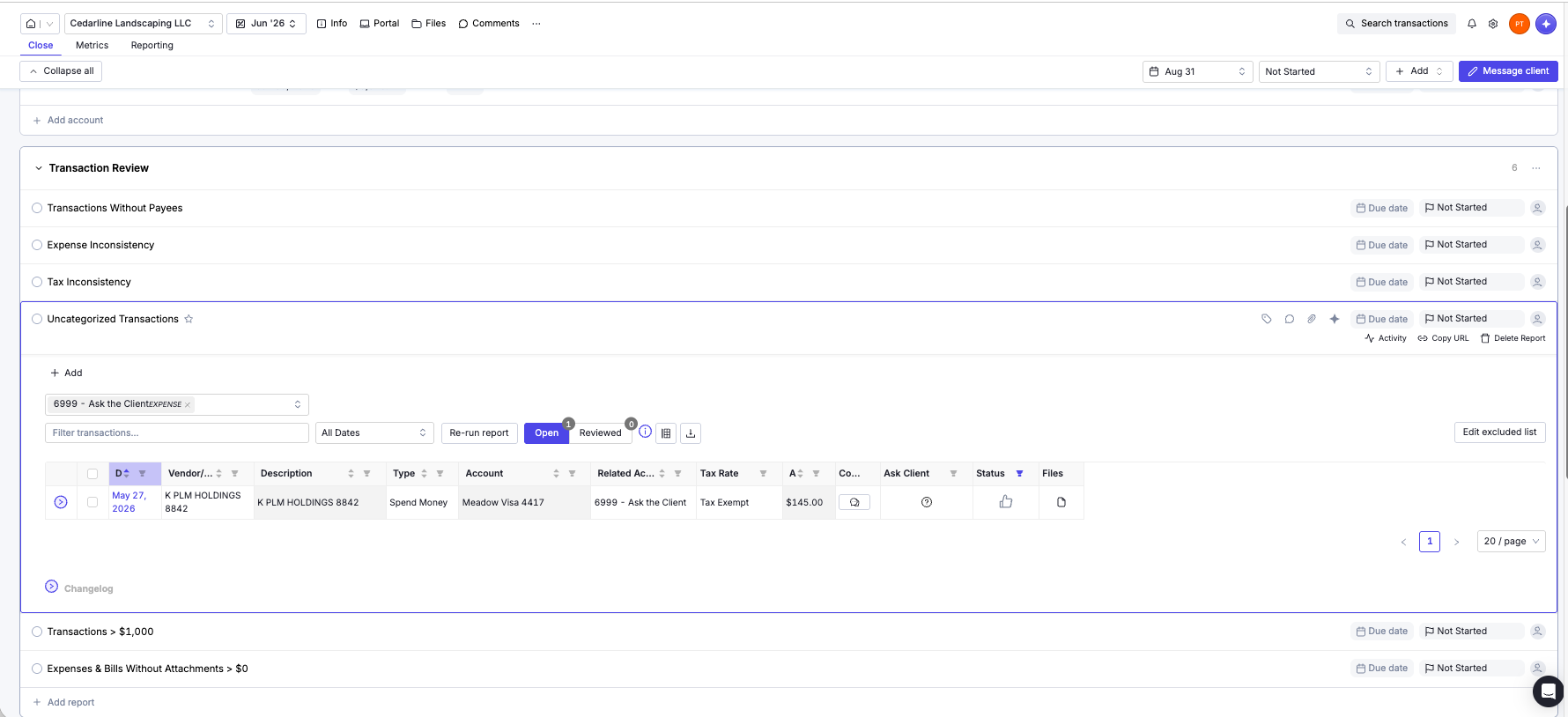
Its default Uncategorized Transactions report arrived already watching our “Ask the Client” account — it recognized the bookkeeping convention without being told — and surfaced exactly one row: K PLM HOLDINGS 8842, $145, the deliberately information-free vendor that every ledger we’ve tested correctly refused to guess at. Found, flagged, and — the detail that matters — with an Ask Client button sitting directly on the row. The tool that finds the question puts the asking one click away.
Sync fidelity checked out everywhere we probed: both bank accounts auto-discovered with reconciled balances correct to the penny, last- reconciled dates known, and the report package’s P&L matching our master dataset exactly.
A real close program, not a checklist with a logo
Out of the box, the June close arrived with seventeen tasks of actual substance:
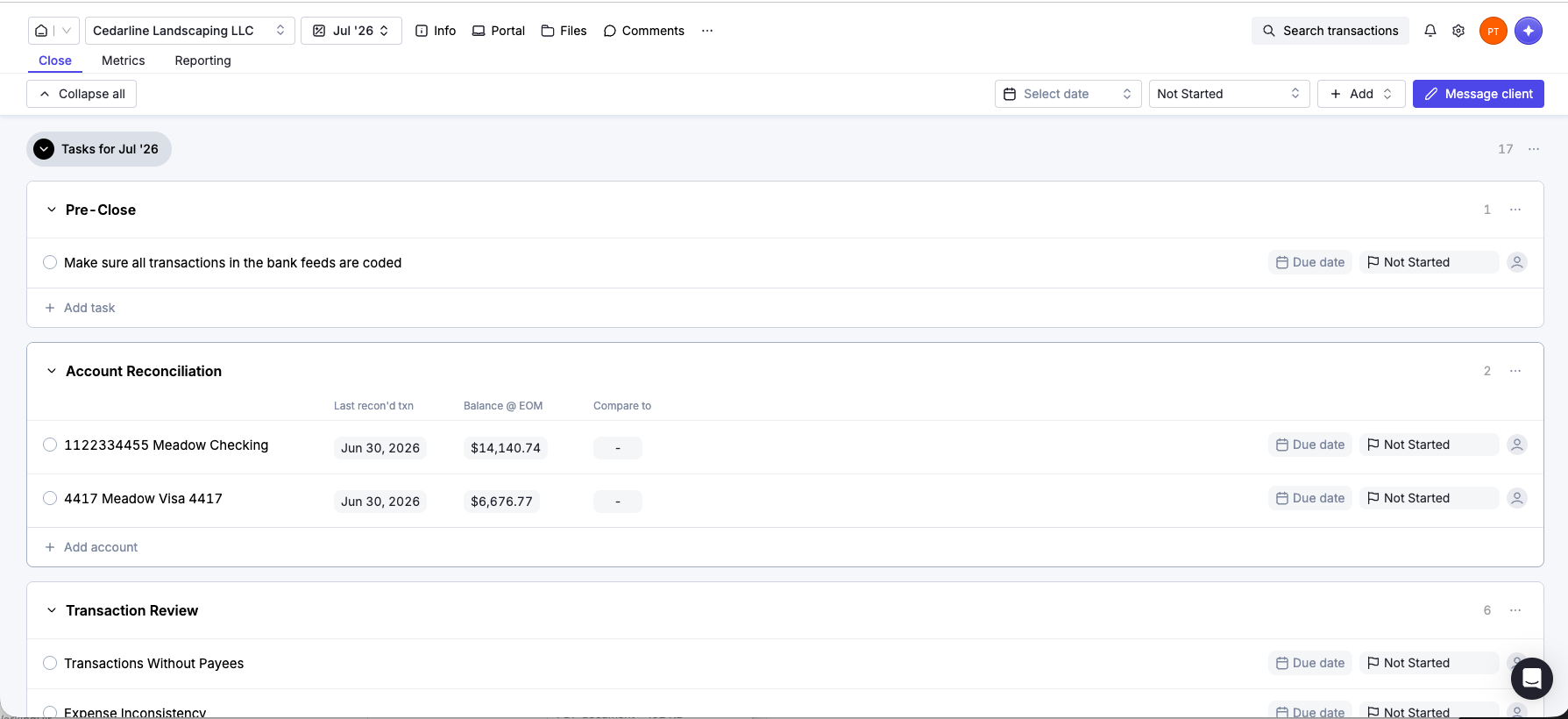
Pre-close feed checks; per-account reconciliation rows that display each account’s last-reconciled transaction and end-of-month balance; a transaction review sweep (uncategorized, no-payee, expense and tax inconsistency, a $1,000 materiality screen, missing attachments); a payee review (new and duplicate vendors and customers, 1099 prep); and a final review of the statements. Every task is a live filtered report, not a checkbox — clicking “Uncategorized Transactions” is how we found K PLM. Periods roll forward with the whole template, prior months can be added retroactively, and tasks take due dates and assignees.
The four-minute loop
Here is the sequence that earned a perfect section score, timed on a Saturday evening with one tester playing both roles.
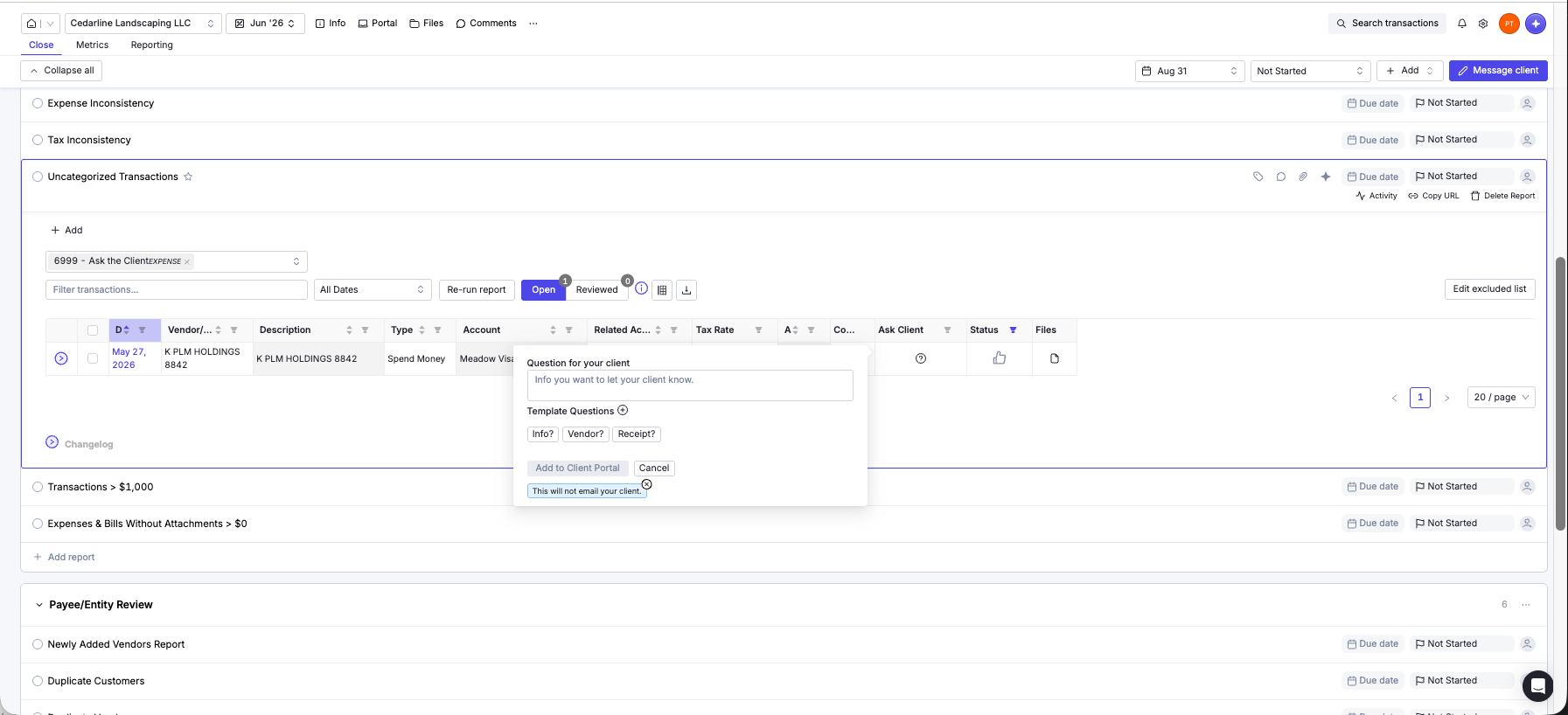
Minute one: on the K PLM row, we clicked Ask Client. Template chips (Info? Vendor? Receipt?) or free text; we typed a real question. A tooltip noted, honestly: “This will not email your client” — questions batch to a portal instead of dripping one email per mystery, which is exactly how client questions should work.
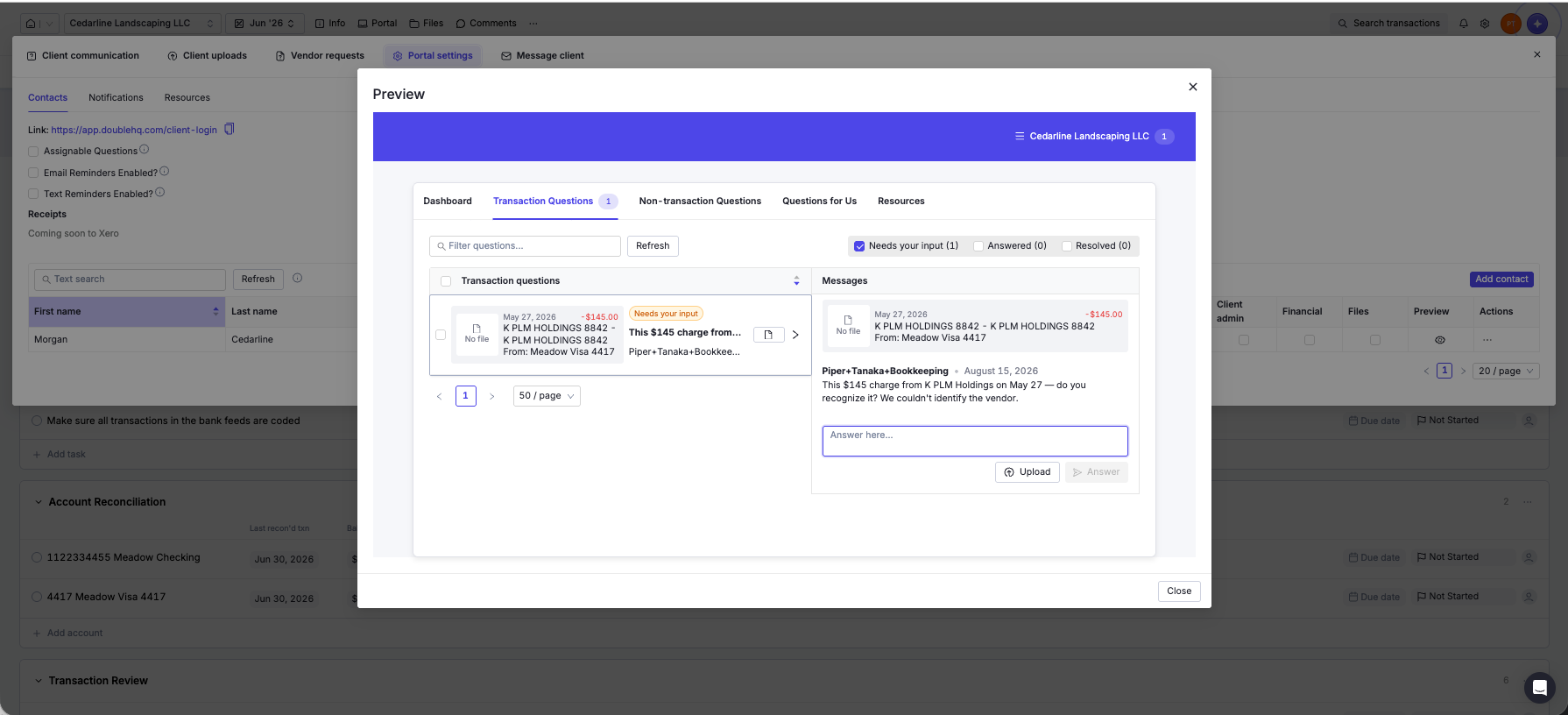
Minute two: the client’s side. Double’s portal uses magic-link login — the client types their email and clicks a link; there is no password, ever. What our fictional owner saw was admirably small: a “needs your input” list, the transaction in plain language, an answer box, and an upload button for the missing receipt.
Minute four: the answer — typed by “Morgan Cedarline,” our invented client — landed back on the transaction itself: threaded, attributed, timestamped, with the row flipped to Responded and a Resolve action waiting.
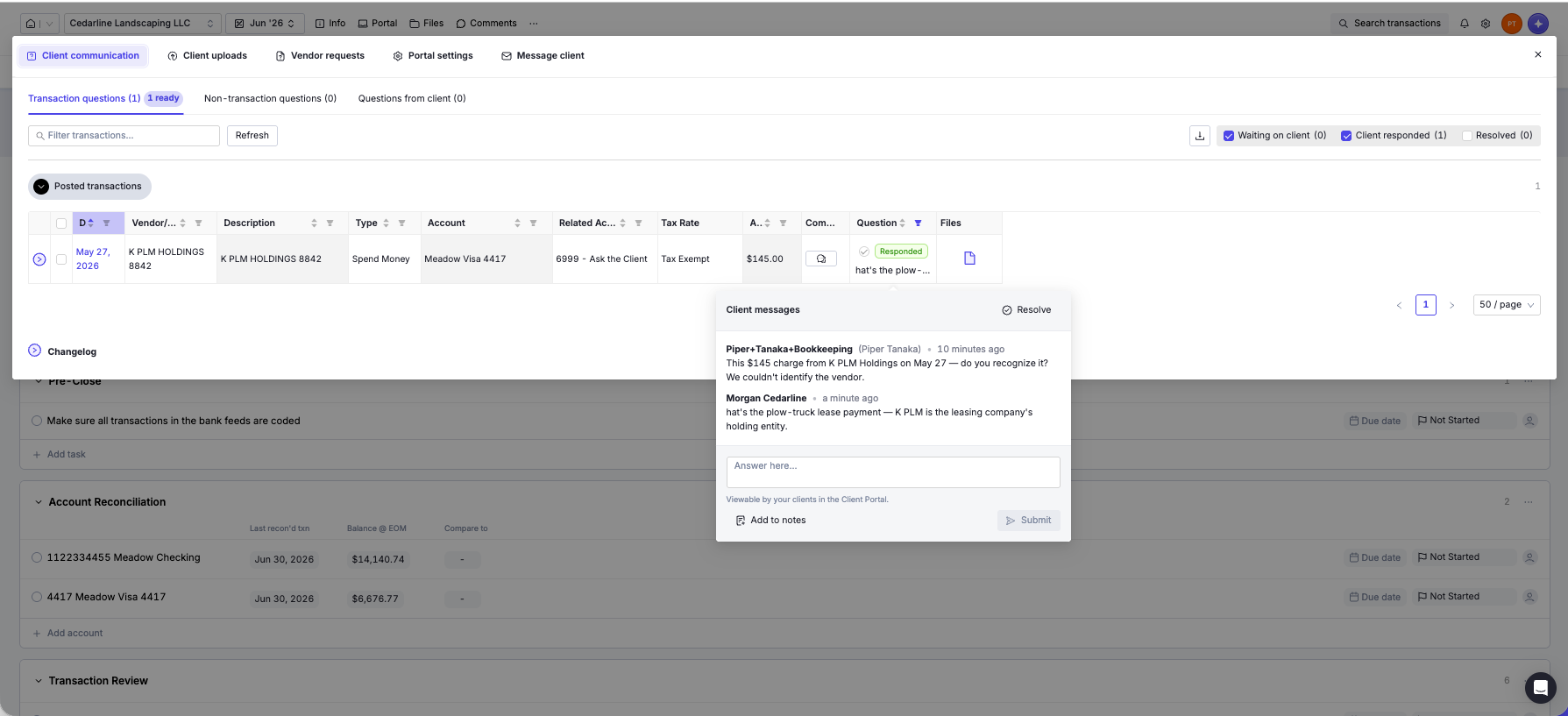
Per-client email and text-message reminders stand behind the portal for the clients who don’t answer in four minutes — which is to say, all of them. This loop is the reason the category exists, and it’s the best implementation of it we’ve seen anywhere. (Content Snare, tested since this review, is a request-and-reminder engine rather than a transaction-level question loop; the two reviews score different things.)
The report your client actually gets
The close ends in an auto-assembled, client-branded monthly package — cover page, executive summary, key accounts, three-month P&L and balance sheet, top spend — with your logo and a “prepared by” line:
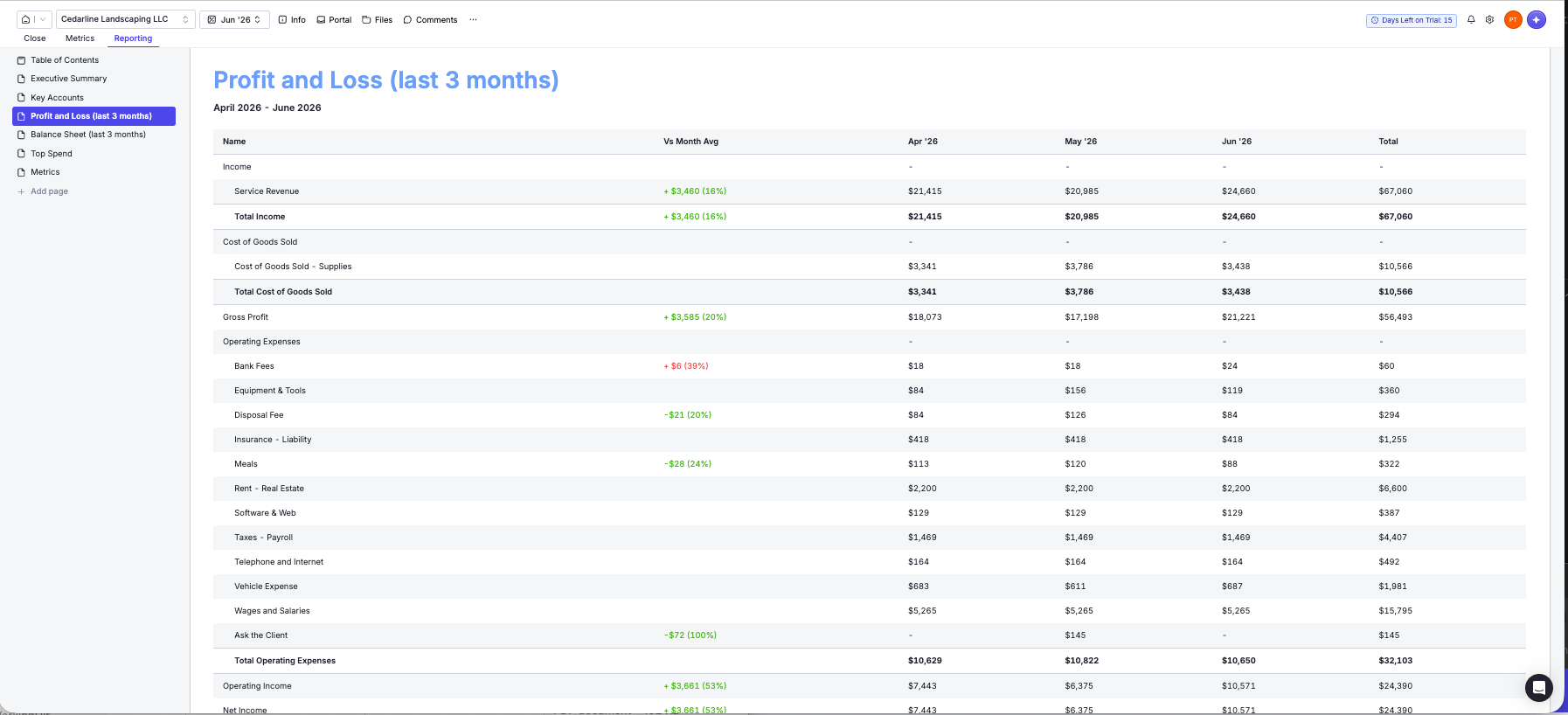
The numbers matched our master dataset, and one detail earned real respect: the “Ask the Client — $145” line appears on the client-facing P&L. The open question is visible on the report itself — polite, structural pressure to resolve it before the package ships.
What it cannot see
Two blind spots, both structural, both worth knowing before you lean on it.
Unapproved paperwork doesn’t exist. Double’s sync reads posted transactions only. Our thirteen draft bills — real paperwork sitting in Xero’s AP waiting for approval — are completely invisible: searching for the vendors returns the posted bank lines and nothing else.
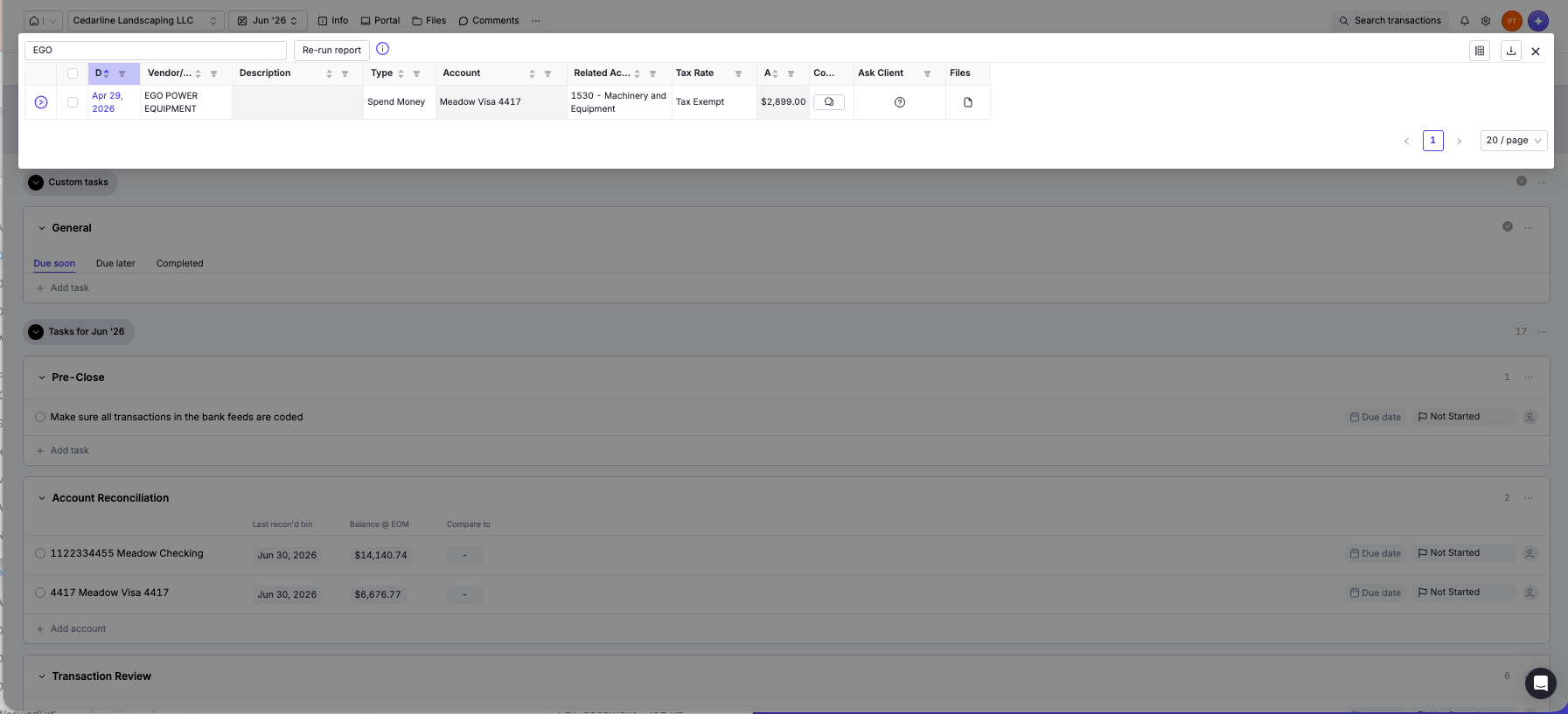
A close that can’t see pending drafts can’t ask “why are thirteen bills sitting unapproved?” — which is precisely the kind of question month-end exists to ask.
Receivables age in silence. The seventeen-task close contains no receivables review, and nothing anywhere surfaces aging — our $7,690 of open invoices appears only as a balance-sheet line. The A/R data syncs; the close just never looks at it. Add your own task, or keep running the aging report in the ledger.
And a first-day warning about noise: the review reports ship eager. The expense-inconsistency check flagged all six of our payroll lines for the entirely legitimate wages-vs-payroll-tax split (an Exclude button tames it), and the missing-attachments report defaults to “greater than $0,” flooding ninety-nine items including an $18 bank fee:
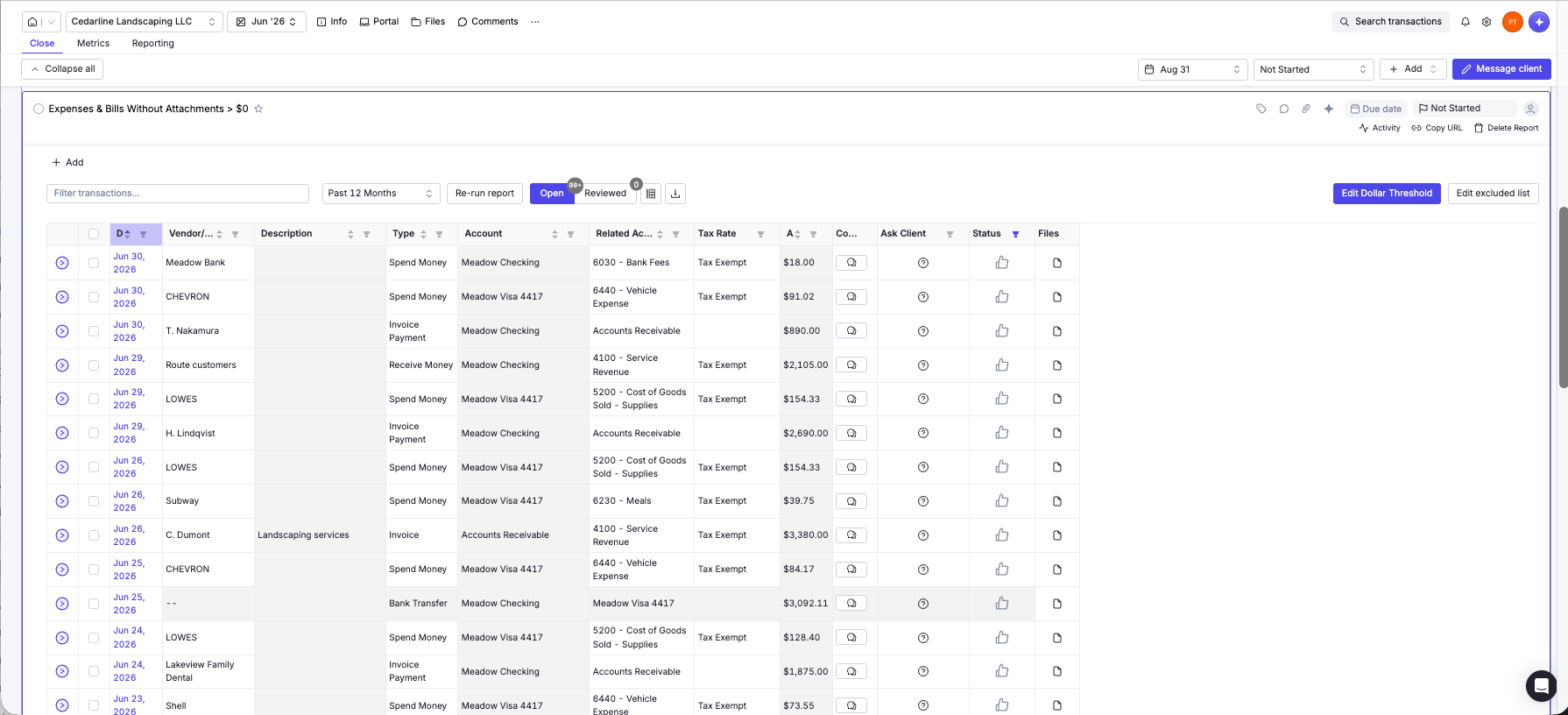
Everything it flagged was factually true — and a real close would wade. Budget your first session for tuning thresholds and exclusions; the second close inherits the calm.
Two smaller notes for the record. The trial’s advertised AI features arrived out of credits — a banner asked us to set up an “overage budget” before the AI had done anything — so the $10 buys the workflow, not the intelligence. And Xero practices are visibly the second integration: the receipts feature is “coming soon to Xero,” and the signup flow assumes QuickBooks first.
The name on the door
One more thing a practice should price in: this tool was called Keeper until late October 2025, and its old domain now redirects to Double. The rename changes nothing about the product we tested — but a workflow tool asks you to move your close process, your client portal, and your muscle memory into it, and venture-backed workflow tools rebrand, reprice, and occasionally vanish. At $10 a month with no minimum and your ledger still holding the actual books, the exposure is small. It is not zero.
What practitioners say
Alyssa Lang — a bookkeeping-practice systems coach who runs Workflow Queen and uses the tool internally — wrote about the pre-rebrand Keeper in a post on her site (disclosure worth knowing: her post carries Keeper affiliate links, so weigh accordingly; we have no relationship with her or Double):
“The transaction inconsistencies checker is super valuable so that we can be extra sure that everything is codded correctly and we have the most accurate books possible. Running month end close with that extra layer of quality control is so much more enjoyable with the use of Keeper.” (sic)
Our lab result agrees with her on both counts — the inconsistency checkers are the substance of the product — and adds the caveat her affiliate-linked post doesn’t: those checkers arrive untuned, and the first close pays the tuning tax.
Verdict
The criterion-zero question from our stack guide — does it beat a disciplined spreadsheet checklist? — gets a clear answer at this price. The checklist alone doesn’t; a spreadsheet can hold seventeen tasks. The rest can’t be spreadsheeted: reports that read the live ledger and found our needle unprompted, reconciliation rows that know their own state, a question portal your client can use without a password, and a branded close package that assembles itself. For any client with a real monthly close, $10 is less than the first saved email thread.
Our trial was free and card-free; Double didn’t know a review was underway, and nothing was written back to the test ledger. Affiliate links, where present, are disclosed and never touch a verdict — as of publication we have no relationship with Double. The books behind this test are downloadable; the mystery charge is on the card statement, waiting for your trial to find it.
Filed under: double · keeper · month-end close · practice management · review