Head-to-head · Bookkeeping
Dext vs Hubdoc for client receipt capture
We fed fifteen identical documents — crumpled thermal photos, a German invoice, a handwritten tip, the same receipt photographed twice — through Dext and Hubdoc into the same Xero org. Both caught what the ledgers miss; how they differ is the whole buying decision.
Our receipt-capture test opens with the finding that reframes the category: both of these tools caught the duplicated receipt that QuickBooks, Xero — and every bank feed we’ve ever tested — waved straight through. We photographed the same crumpled paper receipt twice, from two angles, and submitted both. Each tool flagged the pair and asked a human to decide. The core ledgers, handed the same duplicate as a bank feed, never blinked.
From there the two products diverge completely. Dext is the better machine — it out-extracted Hubdoc on nearly every hard document, finished our entire test in a fraction of the time, and scored 26/32 to Hubdoc’s 24/32 on the same checklist. Hubdoc is the better price — $12 a month flat, and included outright with every Xero business plan, against a Dext pricing page whose practice tier has a ten-client minimum. Which one belongs in your stack depends almost entirely on which ledger you run and who’s paying — so this review shows you exactly what each behavior costs.
How we tested
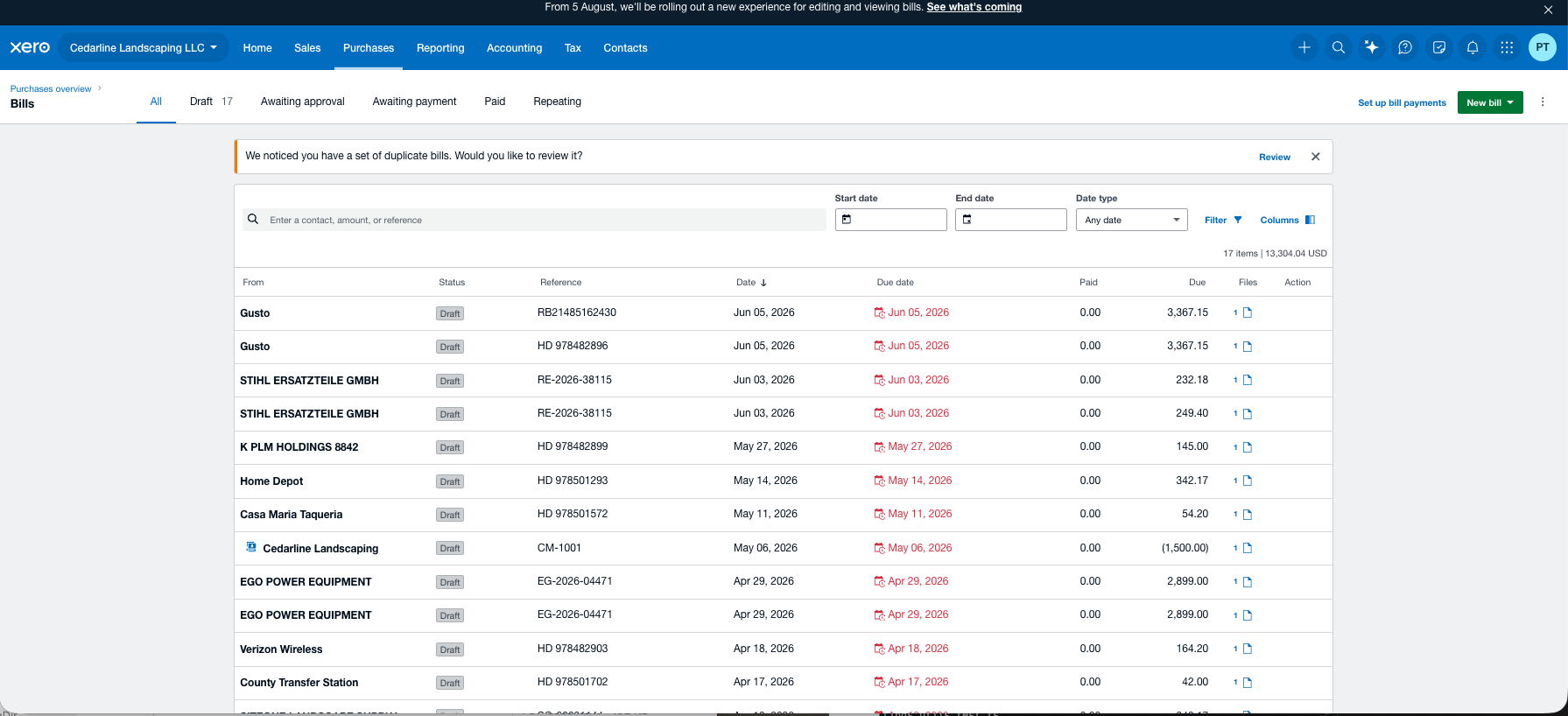
Fifteen documents, identical for both tools, fed into the same Xero organization holding our standard test company’s reconciled books: nine PDFs uploaded or emailed in, six photographed paper receipts submitted through each tool’s mobile app — the real client path. The set is deliberately boobytrapped: the same receipt photographed twice, a decoy invoice for the identical amount, a two-page invoice with the total on page 2, a German invoice in euros with comma decimals, a restaurant receipt with a handwritten tip, a faded and skewed scale ticket, a vendor with no identifying detail, a payroll summary that the bank settled as three separate debits, and a credit memo. Every extraction claim below is checked to the penny against the ledger the documents came from, and everything either tool published landed as a draft — reviewed, never approved.
Pricing, verified
Prices checked August 13, 2026, at signup. Neither trial demanded a credit card — a pleasant surprise after the card-fuse trials of the core ledgers.
| Dext | Hubdoc | |
|---|---|---|
| Single business | $31.50/mo (250 docs, 5 users) | $12/mo flat |
| If you run Xero | Same price | INCLUDED — free with every Xero business plan |
| Practice tier | $23.92/client/mo, 10-client MINIMUM ($239.19/mo floor); $20.35 at 20 clients | $12/mo per client org, no minimum |
| AI category suggestions | $10.50/mo add-on | Not offered |
| Free trial | 14 days, no card required | 30 days, no card required |
Numbers age; the pricing tracker carries the current, dated verification for every tool we test.
Read that practice row twice. A solo bookkeeper with four capture clients cannot buy Dext’s practice tier at four clients — the minimum bills you for ten, a $239.19 monthly floor. And if your clients are on Xero, Hubdoc’s marginal cost is zero: it’s already in their subscription. Dext has to be better enough to be worth paying for against free, which is the honest frame for everything that follows. (Spoiler: on extraction, it genuinely is. Whether that matters at your volume is the decision.)
The bottom line first
| Dext | Hubdoc | |
|---|---|---|
| Capture & extraction (8) | 6 | 7 |
| The traps (10) | 10 | 8 |
| Coding & ledger push (8) | 5 | 4 |
| Workflow & practice fit (6) | 5 | 5 |
| Total (32) | 26 | 24 |
| Active time, full test | ≈ 34 min + a photo batch | ≈ 1 h 28 m + overnight queues |
Dext’s 10/10 on the traps section is the first perfect section score of any tool we’ve tested, in any category. Hubdoc’s capture-section edge is real too — and it comes from somewhere unexpected, which brings us to the most interesting thing we learned all week.
Two machines, one of them partly human
Feed both tools an easy PDF and they behave identically: near-instant, accurate extraction. Feed them something hard and they reveal opposite architectures.
Dext is a machine all the way down. Every document — easy or brutal — came back in the same window: PDFs in seconds, photos in a uniform 35–40 minutes regardless of difficulty. It never failed to return an answer.
Hubdoc, on the evidence, quietly escalates hard documents to people. Its easy documents processed in moments, but hard ones took three-plus hours — and came back with a tell. Fast-lane extractions normalize supplier names (“Northern Tools” from a receipt reading NORTHERN TOOL + EQUIP); slow-lane extractions return them verbatim, store number and all (“Shell Oil 5744”) — the fingerprint of a person reading the paper and typing what they see. Slow but right: the faded scale ticket, perfect; the ambiguous no-detail vendor, perfect; the handwritten tip, perfect. The practical cost is planning around it — a client’s afternoon submission may not be codeable until tomorrow.
Where the human queue can’t save Hubdoc is documents its pipeline rejects outright. Our payroll summary — a clean, machine-generated PDF — sat for hours and came back a hard red Failed, every field blank:
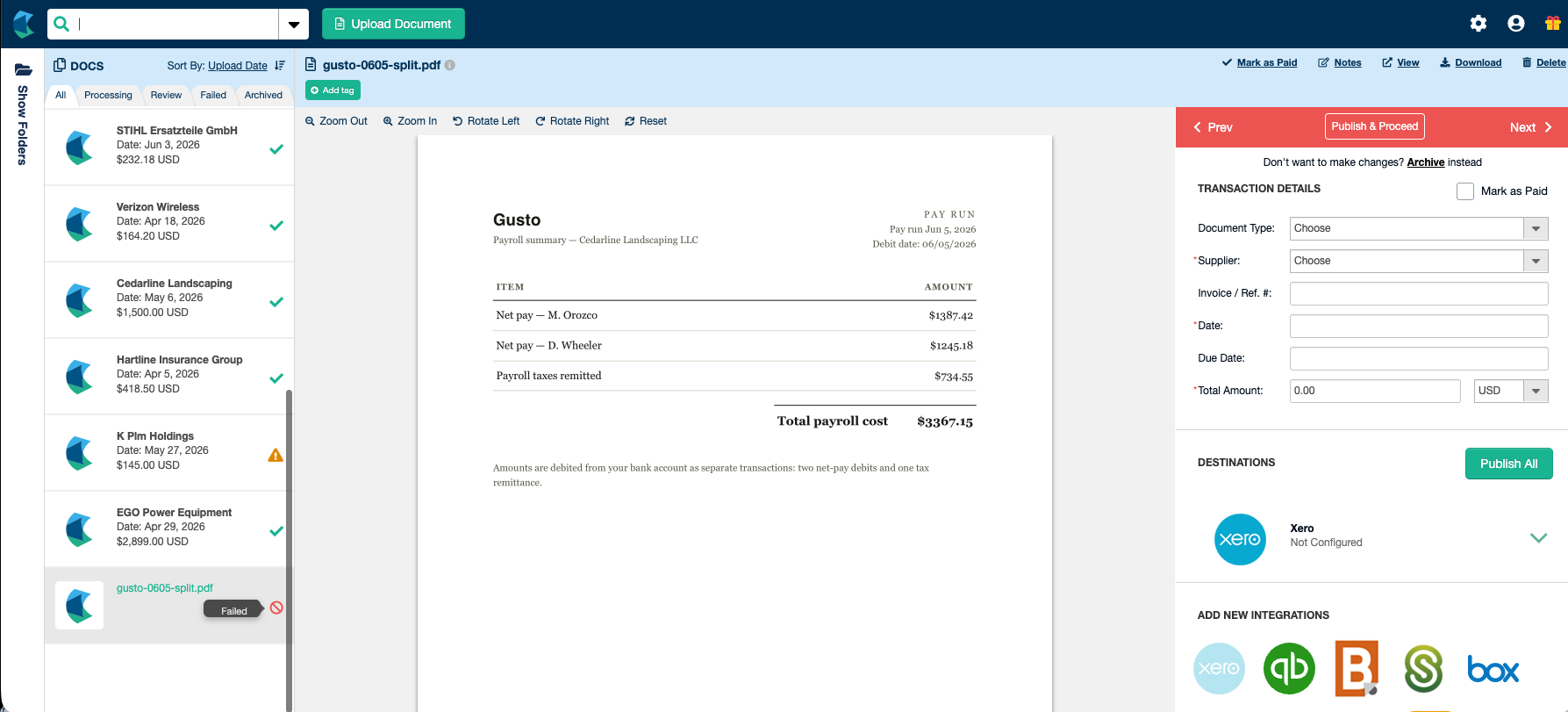
Dext extracted the same document, correctly, in seconds. That pattern repeated on the two documents that decide this section.
The $2,899 mower. A pristine generated invoice: one big line item at $2,499, options bringing the total to $2,899. Hubdoc extracted the line item as the total — a wrong number on the most expensive document in the test, delivered with full confidence:
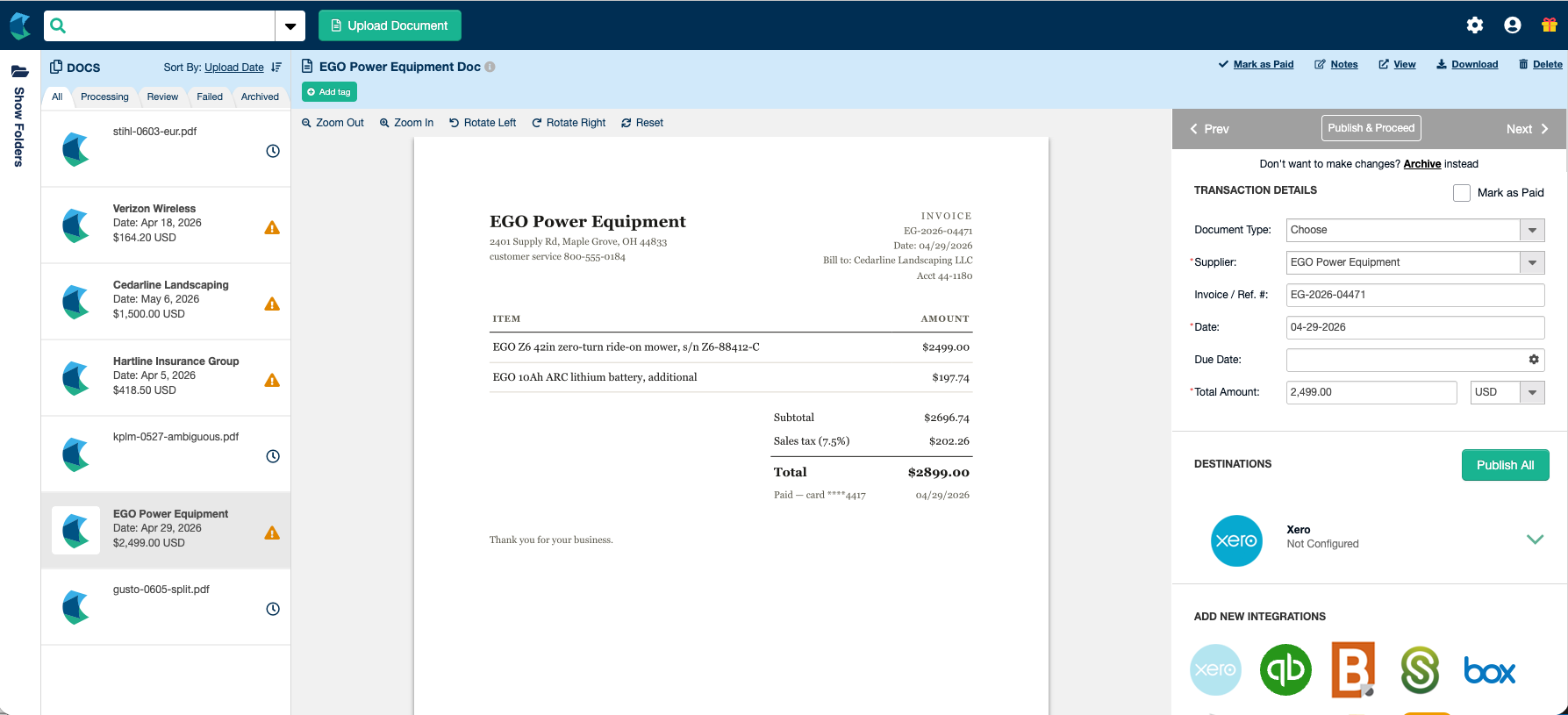
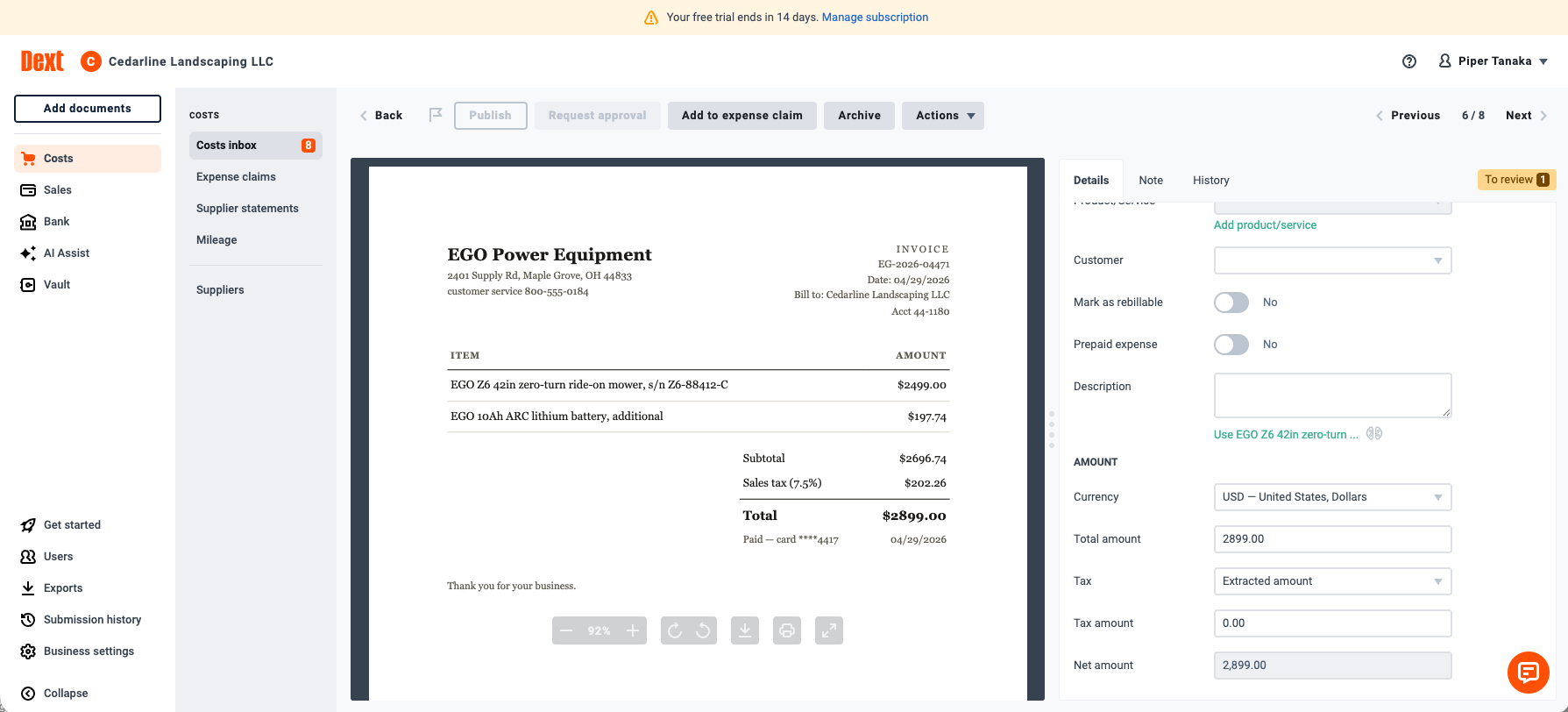
The German invoice. Euros, comma decimals (“214,50”), a DD.MM.YYYY date, 19% VAT. Hubdoc processed it for fifty minutes and surrendered — every field blank:
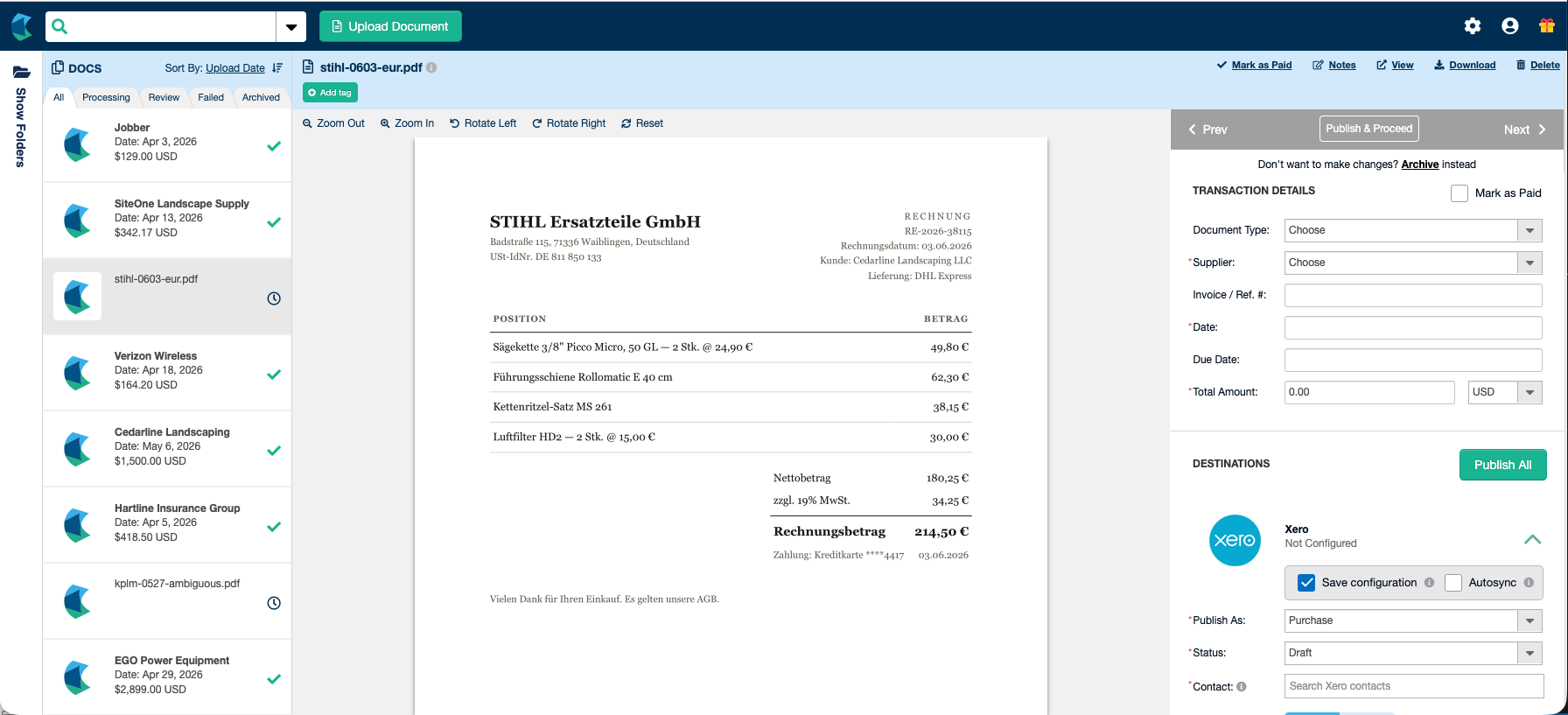
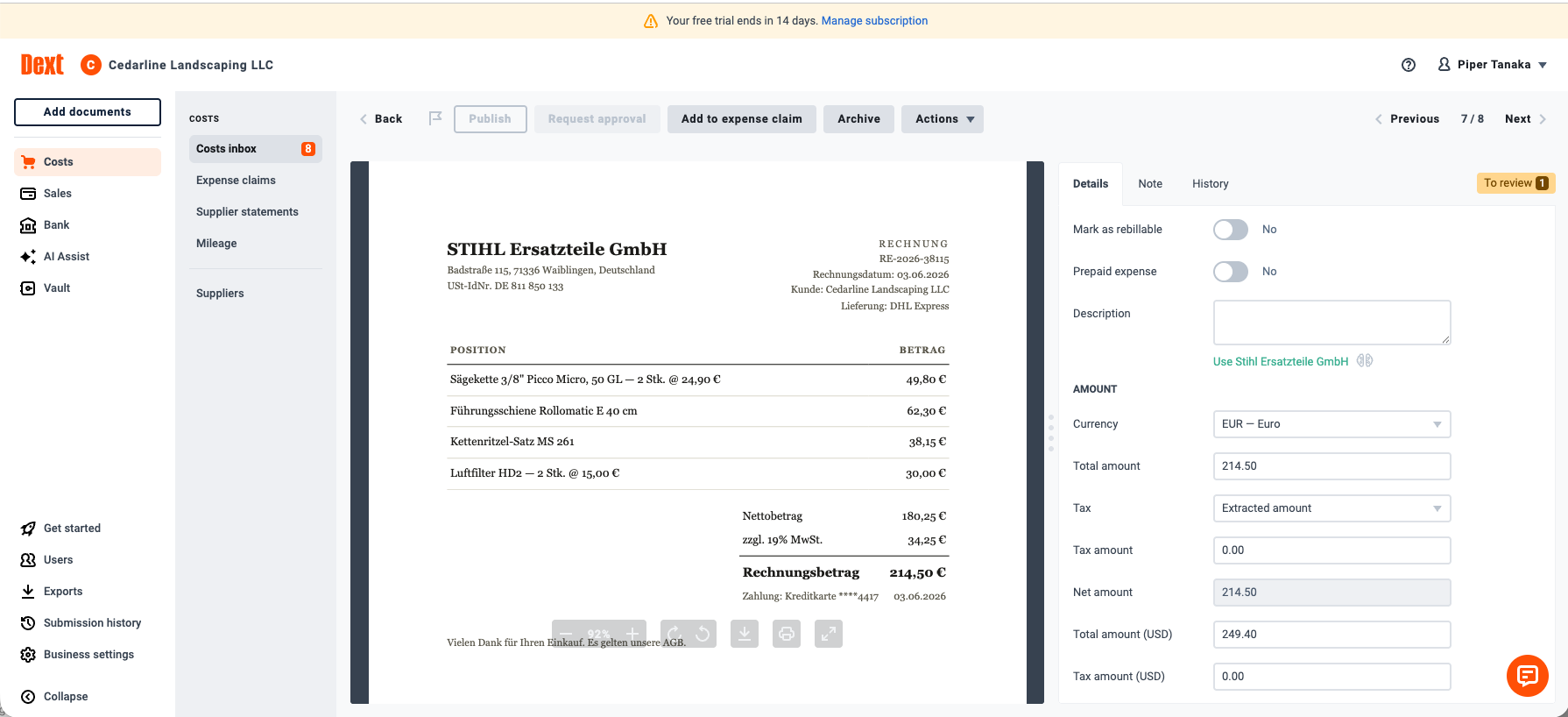
Dext read the whole thing — currency detected, comma decimal parsed, the date correctly interpreted as June 3 — then produced its own USD conversion ($249.40) which matches neither the bank’s settlement ($232.18) nor the separate $6.97 foreign-transaction fee. Nobody’s exchange rate agrees with anybody’s; the document, the tool, and the bank are three different numbers. That’s not a Dext defect, it’s the foreign-currency lesson in miniature: extraction can be perfect and the human still owns the reconciliation.
For the record, both tools aced the test we expected to separate them: the faded, skewed scale ticket came back complete and correct from each — and the restaurant receipt’s handwritten tip arithmetic (42.50 + tax + scrawled tip = 54.20) was read correctly by both. Dext did it by machine in 35 minutes; Hubdoc took the multi-hour human path to the same right answer.
The duplicate test
The headline test, and the reason this category exists. Two different photographs of the same paper receipt, submitted with everything else in between — including a decoy invoice from a different vendor for the identical dollar amount, planted to punish lazy amount-matching.
Both tools passed, completely: the twins flagged, the decoy untouched.
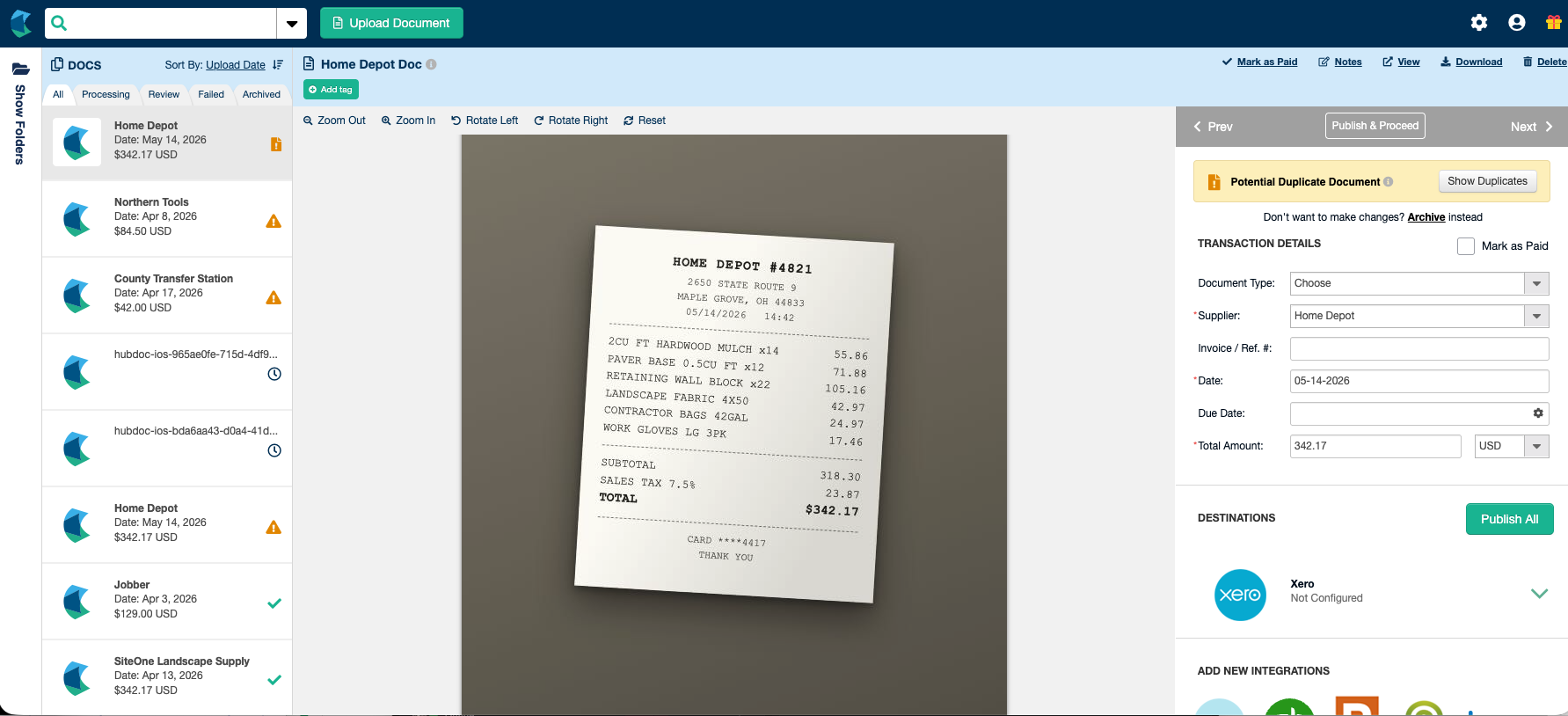
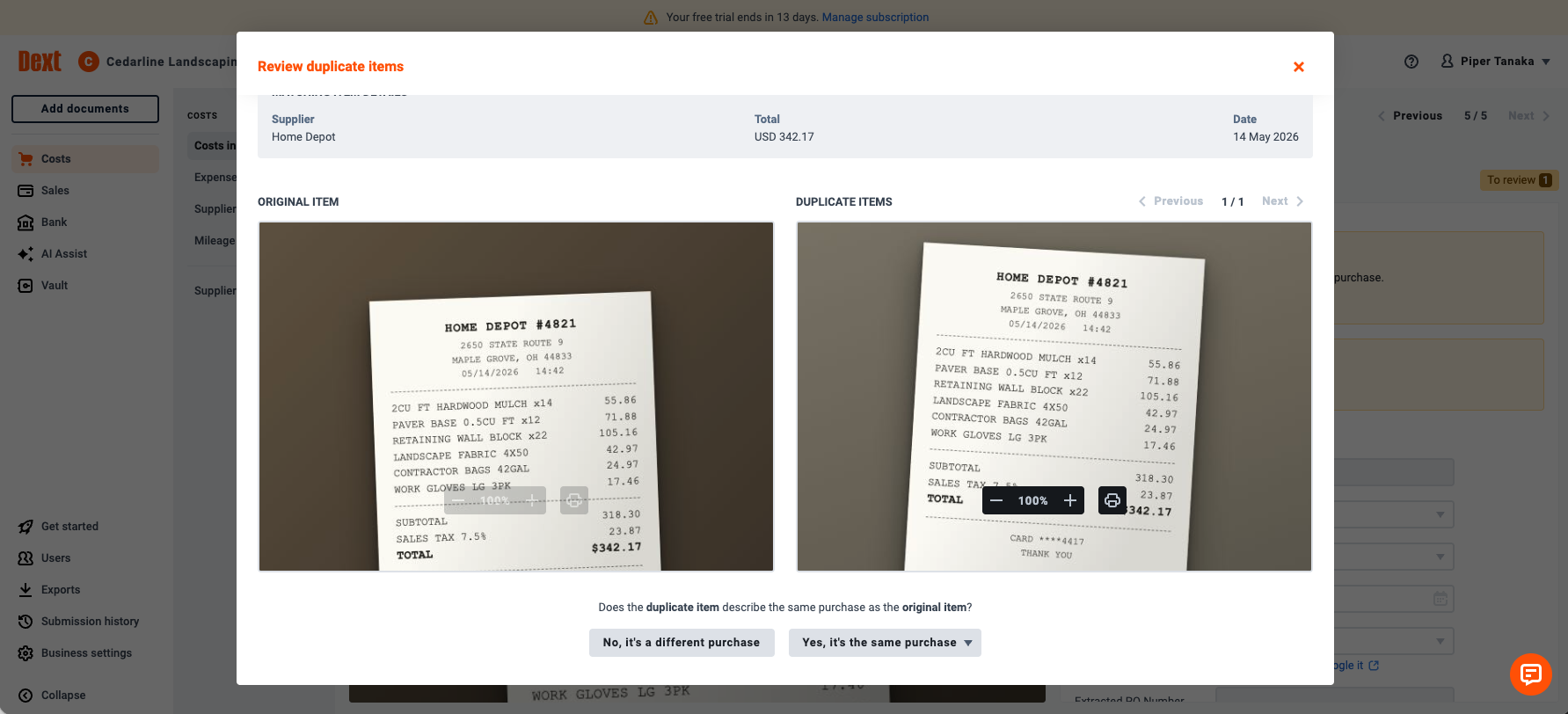
Dext’s triage is the nicer piece of design — both images in one zoomable view, a plain-language question, explicit yes/no — but the score is 2/2 for each. Sit with what that means: FreshBooks caught the bank-feed version of this trap while the market-leading ledgers didn’t, and now both dedicated capture tools catch the paper version. Duplicate detection is a solved problem everywhere except inside the ledgers themselves.
Dext’s one real flaw: it reads dates like a European
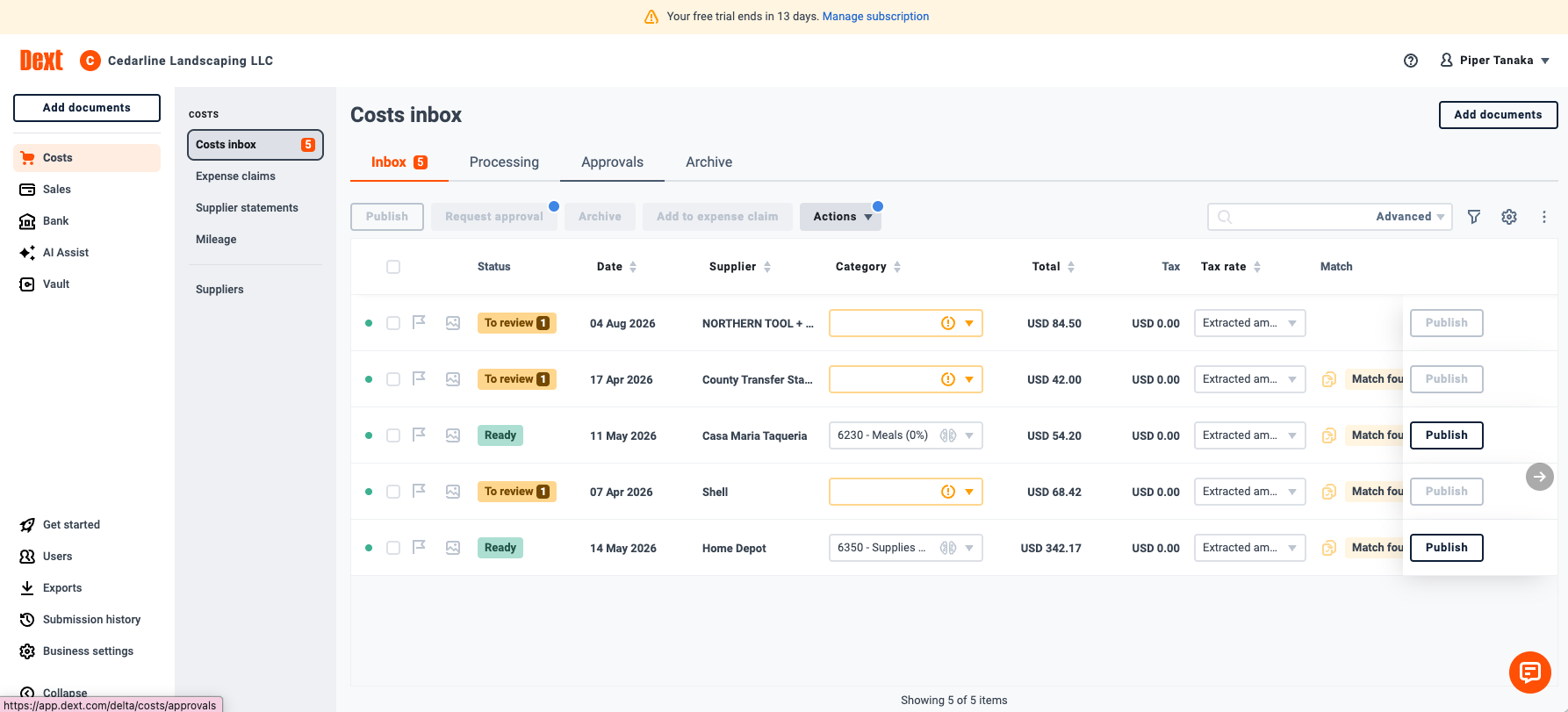
Every tool in this test earns one systematic defect, and Dext’s is dates. Shown an ambiguous US date, it reads day-first: our insurance bill dated 04/05 was extracted as “04 May” (it’s April 5th), and a receipt dated 04/08 became August 4th. Three documents in our set had flippable dates; Dext flipped every ambiguous one. On the insurance bill it at least knew it was unsure — a green one-click “Set to 05 Apr” suggestion sat next to the wrong date. On the receipt it flipped silently.
Why this matters more than a date field: Dext’s best feature (next section) works by matching documents to bank transactions by date and amount. The receipt with the silently-flipped date was the only document in our test that feature failed to match — the bug quietly disables the tool’s own headline capability, four months off target:
Hubdoc read every unambiguous date correctly and never flipped an ambiguous one on us — though on the German invoice, where day-first was correct, that conservatism was academic since it extracted nothing at all.
Getting coded: two philosophies, again
Neither tool, remarkably, guesses categories — the confident wrong guesses that made QuickBooks dangerous simply don’t exist in this category’s base products.
Hubdoc suggests nothing, ever, by design. Every account is picked by a human; a per-supplier “save configuration” repeats your choice afterward. Zero wrong guesses, one hundred percent of the coding labor yours. It also structurally cannot silently mis-file our ambiguous no-name vendor — every document waits for a human account pick, so the mystery lands in review, never in Office Expenses.
Dext’s base plan suggests nothing from AI (that’s a $10.50/month add-on we didn’t buy) — but it does something quietly better: it reads the connected ledger’s history and pre-fills the account your books already use for that supplier. Our recurring vendors arrived pre-coded to the exact accounts we’d coded them to in Xero — recall, not guesswork, and it was never wrong because it only repeats decisions your books already made. New vendors get a mandatory category field and a human decision, so the ambiguous vendor is exactly as safe as in Hubdoc.
The one coding judgment neither tool attempted: our $2,899 mower is a capital purchase, and our payroll summary totals a number the bank settled as three separate debits. Both tools let a human decide the first (asset accounts are in both pickers) and neither so much as warned about the second — Hubdoc because it extracted nothing, Dext because it extracted everything perfectly and then published a draft bill that can never match the bank feed, in silence. Loud failure and silent success, same score.
Into the ledger
Publishing is where Hubdoc’s score bled. Its default publish type files receipts as accounts-payable bills, while a card-paid receipt — the most common document in the shoebox — needs to be a spend-money transaction to match the bank feed; nothing explains this, so the default quietly manufactures unmatchable AP entries. Its publish failures are silent (a document just reads “Not Published”), and we traced one to a gone-in-one-shot contact-creation step that a failed publish discards without saying so. Its supplier-name normalization also broke Xero contact matching and minted near-duplicate contacts along the way.
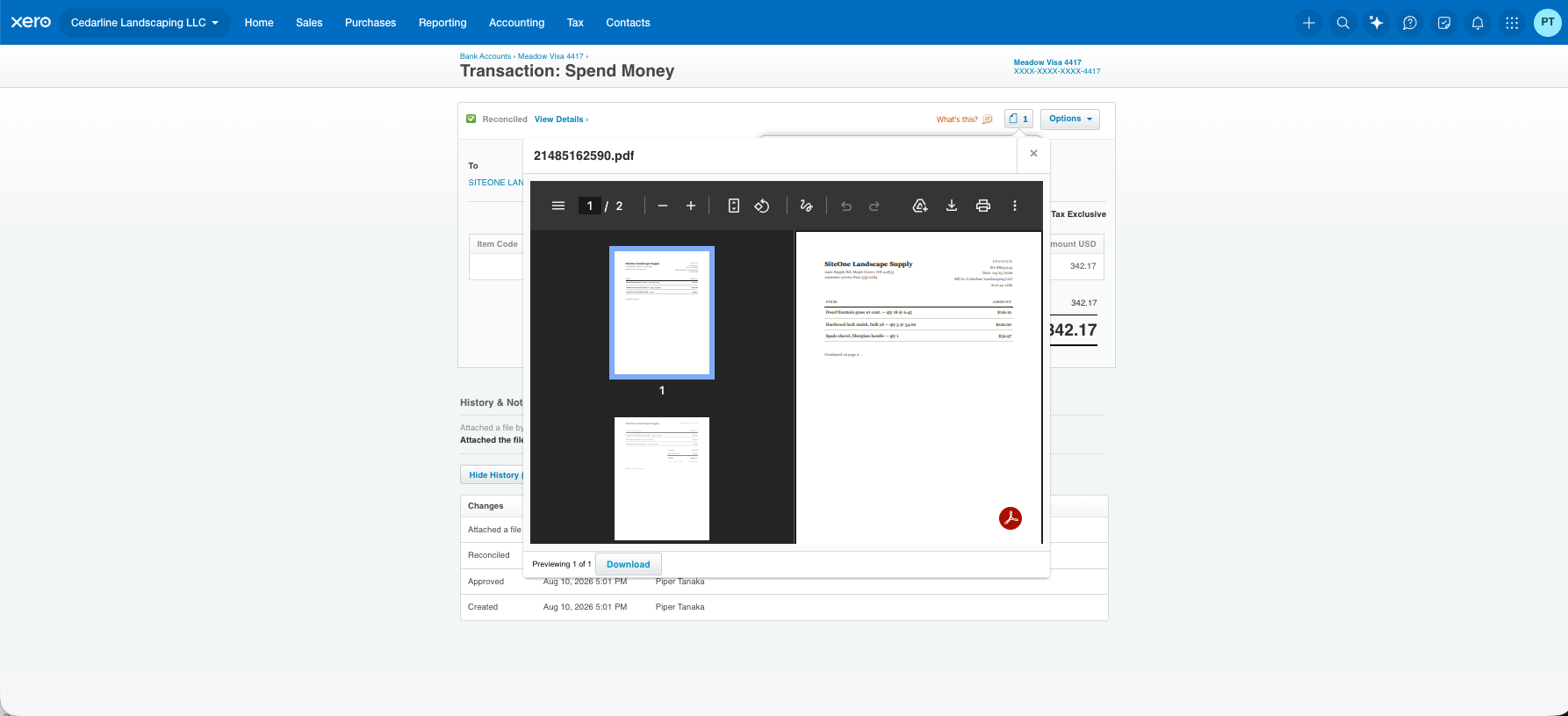
Dext ships the opposite idea, and it’s the best thing in either product: Paperwork Match. Instead of creating a new transaction at all, it finds the existing coded bank transaction in Xero and attaches the source image to it — no duplicate entry, books untouched, audit trail complete. Our two-page invoice was matched to the right charge out of four identical $342.17 charges from the same vendor in the quarter, by date proximity, with both pages attached:
Two smaller fidelity notes from the drafts both tools left in Xero. Dext preserves each document’s own reference number (the invoice number on the paper is the reference on the bill); Hubdoc stamps its internal ID on everything, so the paper’s identity is lost. And on the credit memo — money coming back — Dext auto-classified it as a credit note and preserved the negative amount end-to-end, though it read the wrong party as the supplier; Hubdoc read the same document as a $1,500 purchase with the sign stripped, and only a manual publish-type override (which you must know to look for) prevents it booking a refund as an expense.
The client’s phone
Both apps clear the bar a client will actually tolerate — our tester’s verdict after running both: “Capturing with the Dext app is every bit as straightforward as Hubdoc — the difference is the wait: every photo took half an hour or more to process, where Hubdoc handled most instantly and only sent the hard ones to its slow queue.” Dext’s capture screen is the more polished of the two (live edge-detection framing, single/multi-page modes, a document-type selector right in the camera), and the processing wait is invisible to the client — it costs the bookkeeper same-hour coding, not the client’s patience. Both tools also accept documents by email-in address, which for some clients will beat any app.
What practitioners say
Our lab result — Dext the better machine, Hubdoc the better price — turns out to be the practitioner consensus almost verbatim. Stephen Beard, managing director of Plyo Bookkeeping, a Vancouver bookkeeping firm, put it this way in the firm’s own comparison:
“Not all OCR software are created equal, and the consensus seems to be that Dext is superior to Hubdoc when it comes to reliably extracting the correct information into the correct data field. While Hubdoc will certainly be fine for the majority of standard invoices, it’s software will be less able to correctly interpret hand written invoices and receipts compared to Dext.”
And on the other side of the scale: “Hubdoc still does an excellent job at the all the core features of an OCR accounting software, and at just $12 per month it represents excellent value for money.”
One nuance our test adds to that consensus: on our actual handwritten challenge — the scrawled tip — Hubdoc got the right answer too. It just took hours where Dext took minutes, which is the real difference hiding inside most Dext-vs-Hubdoc folklore: not whether the hard documents get extracted, but when, and by what.
Verdicts
The stack advice, unchanged from our tech-stack guide but now with evidence: if you’re on Xero, start with the Hubdoc you already have — at zero marginal cost it only has to beat the shoebox. Move to Dext when capture becomes your bottleneck: when volume makes its per-document speed compound, when your documents get hard (foreign invoices, handwritten paper, odd formats), or when Paperwork Match alone would save you from unpicking duplicate bills. If you’re not on Xero, the free-Hubdoc argument evaporates and Dext’s scorecard win stands on its own.
Both trials were free and card-free; neither vendor knew a review was underway. We have no relationship with either company beyond any affiliate links disclosed above. The fifteen documents are downloadable — run them through your own trial and check our work.
Filed under: dext · hubdoc · receipt capture · comparison · xero